1

I've downloaded hundreds of songs from SXSW 2009 Showcasing Artists. In Songbird, I've filtered out a lot of songs which I don't like, i.e. gave rating of one to them. I hope to delete all these from my hard disk, but it's a feature yet to implement in Songbird.

The most close solution I could get is this. But it works not well, and always messes files around.

So, hope you could bring up a reliable and better solution.

niton
  • 1,796
  • 14
  • 21
  • A bug related to this: http://bugzilla.songbirdnest.com/show_bug.cgi?id=1912 –  Sep 26 '09 at 13:31
  • Did you notice this line in the solution link you provided : "If you want to use the script, please make sure you change path to your database file in the batch script". – harrymc Sep 26 '09 at 16:39
  • Yeh, I've noticed it. And I did successfully removed some files by using this methods. –  Sep 27 '09 at 14:40

3 Answers3

1

I use the Managed Music MODE for managing my music. Thats the best way. Whenever you want to add a mp file to library, it will automatically be copied to managed music folder and you can delete the original fire right then.

Now, If you delete a song from library, the corresponding mp3 file from the managed music folder is also deleted automatically.

So, if you use Managed Music mode, you dont have to really worry about this.

Abhijeet Rastogi
  • 3,497
  • 5
  • 33
  • 43
0

Here is a simple way of deleting files from disk: http://bkdonline.wordpress.com/2010/01/27/delete-songs-through-songbird-from-disk/

  • Whilst this may theoretically answer the question, [it would be preferable](http://meta.stackexchange.com/q/8259) to include the essential parts of the answer here, and provide the link for reference. – Tamara Wijsman Nov 01 '11 at 19:24
0

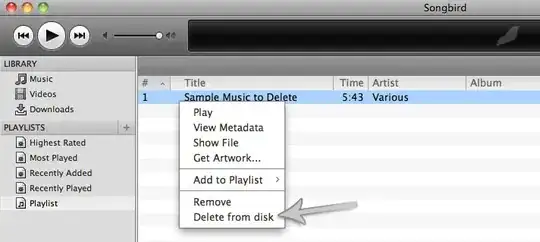
Songbird has a Delete from Disk plugin that looks like it will do what you want. Just sort by rating, select all rating 1 files, and Delete from disk?

enter image description here

Tamara Wijsman
  • 57,083
  • 27
  • 185
  • 256
Raven
  • 1,388
  • 1
  • 9
  • 11