3

Since upgrading to OS X Mountain Lion, every time I restart my computer I am alerted

Do you want the application "Growl.app" to accept incoming network connections?

Picture.png

Even though I click "Allow" this message continues to plague me upon restart.

Silva says use codesign -vvv to verify the application is signed. It verifies:

$ codesign -vvv /Applications/Growl.app
/Applications/Growl.app: valid on disk
/Applications/Growl.app: satisfies its Designated Requirement

It also seems that reinstalling the program does not help. How can I get rid of this message?

cwd
  • 17,668
  • 42
  • 121
  • 159

1 Answers1

1

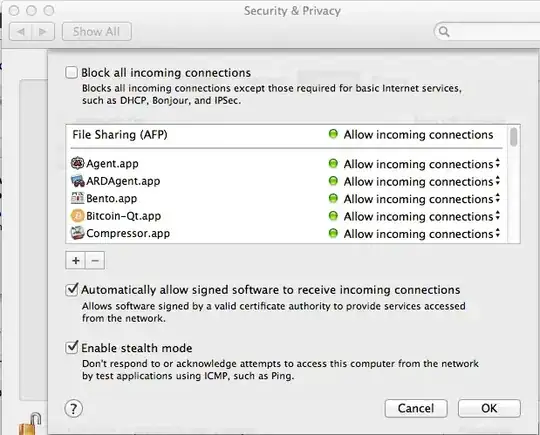
In System preferences Select Security & Privacy (Top row). When you click on it, this will come up: enter image description here


Click on the box that says Firewall options. This is the next screen you will see: enter image description here


Click on the + button in the middle left side and add Growl to the list. This should alleviate your problem.

Everett
  • 5,912
  • 1
  • 22
  • 33
  • Nice. I was assuming Growl was automatically added to this when I clicked `Allow`. Thanks! – cwd Sep 17 '12 at 19:53
  • 1
    Just as an FYI, there is a nice little GUI front end for the Firewall called IceFloor ( http://www.hanynet.com/icefloor/ ). It adds a little more capability, and if you know what you are doing with PF Firewalls, it's a nice way to manage it. Just thought I'd mention it so that you're aware of it. – Everett Sep 17 '12 at 20:03
  • I have AirVideo in there but it still asks me for permission on every startup! – Nimbuz Dec 24 '12 at 04:30