On my Windows XP, I am connected to a network shared folder on another Windows XP machine. I access the shared folder through UNC path, e.g.: \Server\shared_folder1\ When I access it first time, it asks for login credentials; but second time onwards, it opens automatically without showing login dialog box (assuming the same credentials). But I need to use a different credential to access the same shared folder. How can I logout from the shared folder which I have already accessed in the current Windows session without restarting the system?
Asked
Active
Viewed 5.9k times

4 Answers
13
Go to Control Panels/User Accounts
Change an account
Click your account
In "Related Tasks" click "Manage my network passwords"
Remove the network location you want to logout from

bateman_ap
- 231
- 1
- 7
-
`net use \\servername /delete` usually works for me, but for some reason it didn't work last time I used it. This answer helped solve that problem. +1 – Phil Aug 25 '17 at 14:25
-
Great answer. On my windows 7 PC, the location was slightly different: Start menu search "User Accounts", in your account, look left for "Manage Your Credentials". I was able to edit them right there, didn't even need to delete. – Derek Kerton Oct 23 '20 at 02:46
8
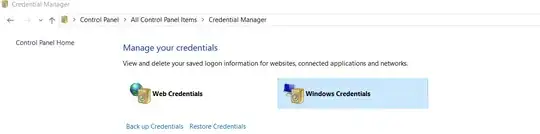
Go to Control Panel\All Control Panel Items\Credential Manager, it will have all the IDs and Passwords of the shared network folders that were saved.

Glorfindel
- 4,089
- 8
- 24
- 37

-
EVERYONE: THIS IS THE BEST AND EASIEST ANSWER!! Use it, then vote it up to help others. – Derek Kerton Oct 23 '20 at 02:50
6
You can goto the command line and remove the shared drive:
net use /delete s:
Then you can reconnect as needed:
net use /persistent:yes s: \\server\dir

Ken Brittain
- 176
- 2
-
2OP'd need `/user:domain\username` as well to switch credentials, otherwise this'd just default to his own user/pw – Aug 19 '11 at 16:53
-
2If not a mapped drive, the syntax is: `net use /delete \\server` Then wait about a minute for the connection to clear. – Ron Feb 02 '16 at 21:19
1
- Goto server dir
\\server\sharenameor\\server\ - Select
Tools -> Disconnect Network Drive... - A window will popup. You select all highlighted and click "OK".
- Now you can link to share folder with new user logon.


-
1Judicious use of Markdown formatting can make this answer look much better. Edit your post, then click the `formatting help` link for more information. – jpaugh May 13 '15 at 03:51