2

How do I set MSE to prompt me on what to do when it detects a virus or malware?

It seems that MSE's real-time protection only allows a default automated option when it detects a virus or malware.

In this screenshot it only allows a 'recommended action', 'remove', or 'quarantine' and I see no option to have it prompt me.
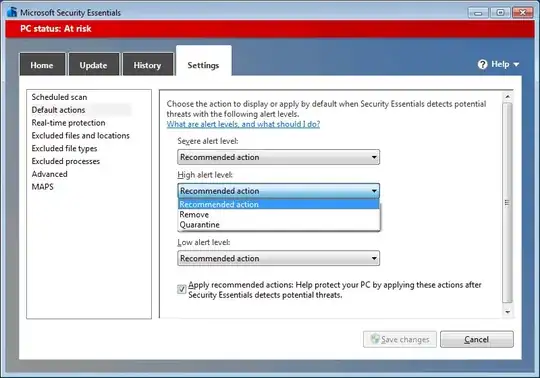
enter image description here

If there is a way to do this, I would prefer if MSE prompts me on what to do, as there are detections that I know are false positives and I would like to have MSE 'ignore' or 'allow' it.

Matteo
  • 7,717
  • 2
  • 42
  • 57
galacticninja
  • 6,188
  • 16
  • 78
  • 120
  • 1
    Default settings are ok, no need to change them, if the infection threat is severe it is best to let MSE handle it using recommended action, delaying this might allow an infection to proceed. – Moab Oct 02 '12 at 15:04
  • @Moab I'm talking about situations where I clearly know that a file detected by MSE is a false positive. I don't want MSE deleting or quarantining that file (depending on what its 'Recommended action' is). MSE won't allow access to the file, until I made a decision on its [prompt](http://superuser.com/a/482250/10259) anyway. – galacticninja Oct 04 '12 at 04:06
  • No way for MSE top read your mind unfortunately. If it is a continual false positive on the same file you can add it to the exclusions list. – Moab Oct 04 '12 at 14:55
  • @Moab As stated in the current accepted answer, there is a way to have MSE prompt me, if it detects malware. Nowhere in my question did I imply that I want MSE to "read my mind". I just would like a prompt on detection - that's all. – galacticninja Oct 04 '12 at 15:15

1 Answers1

2

Try unchecking the "Apply recommended actions ..." box at the bottom. One could reasonably guess that doing that would result in a prompt rather than an automatic action. But that is a guess, and we all know how Microsoft loves to keep its customers guessing!

kreemoweet
  • 4,565
  • 17
  • 19
  • I did that, but I too can't confirm if it works yet, as MSE is still to detect malware in my computer. – galacticninja Oct 02 '12 at 06:22
  • 1
    Goto http://eicar.org/ for *the* default fake virus. This was designed for testing AV apps – Jan Doggen Oct 02 '12 at 13:15
  • @JanDoggen Thanks for suggesting that. I tried the [Eicar anti-malware test file](http://www.eicar.org/86-0-Intended-use.html) and it appears that MSE will indeed prompt if the option mentioned by kreemoweet is unchecked. I initially thought that this won't allow prompting because of the unclear description of the option. – galacticninja Oct 03 '12 at 07:51