In windows 8 there is an onscreen keyboard that makes tapping noises for each key press.
How do I turn this off so I can type like a ninja?
Asked
Active
Viewed 7,866 times
15

Chris W. Rea
- 10,740
- 16
- 76
- 95

George Duckett
- 5,400
- 6
- 27
- 44
-
Are you using a touch screen interface? – avirk Oct 23 '12 at 10:05
-
Yes, although it might be useful to know both cases. – George Duckett Oct 23 '12 at 10:06
3 Answers
10
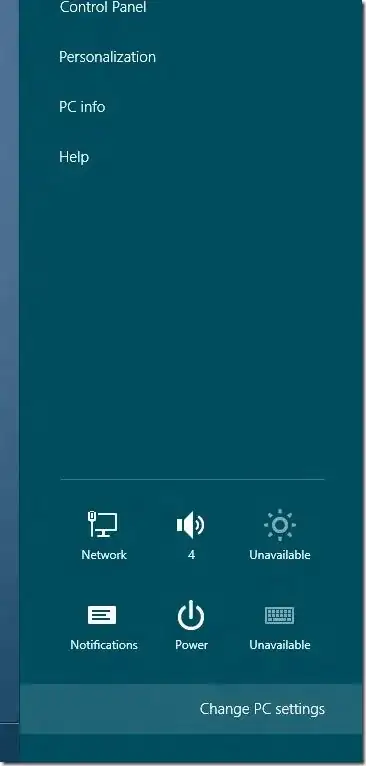
Swipe from the right-edge of the screen to bring up the Charms bar. If you are using mouse and keyboard setup, you need to either move the mouse cursor to the upper or lower right corner of the screen or press Windows + C keys to see the Charms bar.
Click or tap Settings on the Charms bar and then click (or tap) Change PC settings to open PC settings.
For Windows 8.0: Here, click/tap on General in the left-pane and look for an option named Play key sounds as I type in the right-side under touch keyboard section.
For Windows 8.1: Here, click/tap on "PC and devices", then "Typing" in the left-pane and look for an option named Play key sounds as I type in the right-side under touch keyboard section.
Note. that this option may not appear on non-touch devices.

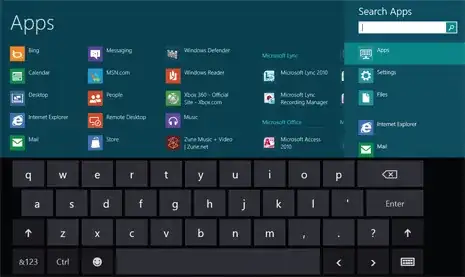
There is a different version on non-touch interface than the touch interface.
Touch screen
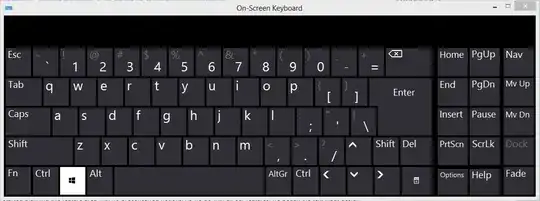
Non touch


-
It definately does not on my non touch screen device. Interesting that they would have two seperate ways of handling the same device. I wonder if the touch device on screen keyboard and the non touch device on screen keyboard are the same. – Journeyman Geek Oct 23 '12 at 10:39
-
-
-
Can't you start the non-touch keyboard by running `osk.exe` on a touch-enabled device? Should be possible since the touch keyboard is part of the OS while the non-touch keyboard is a separate program. – ADTC Feb 25 '14 at 11:20
7
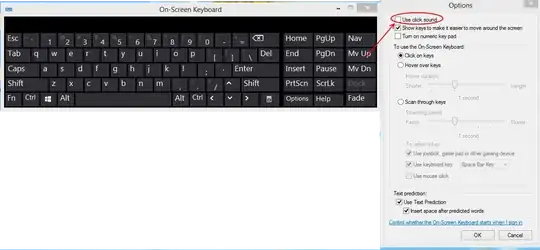
You can do it from the on screen keyboard options. Hit options and deselect "Use click sound"

Journeyman Geek
- 127,463
- 52
- 260
- 430
-
Hahahaha I was just find that too in keyboard, and you beat me in upload the image, my slow bandwidth :P. – avirk Oct 23 '12 at 10:12
-2
You can do it from the on screen keyboard options. Hit options and deselect "Use click sound".

harrymc
- 455,459
- 31
- 526
- 924
