I added my Outlook mail account and Gmail account to the Mail app of Windows 8. Now I want want to remove one of those account from the app. How do I do that ? I searched every where but there if no option to that. Does any one know how to do that ?
Asked
Active
Viewed 2.1k times


1 Answers
6
Activate the charm bar with win - C
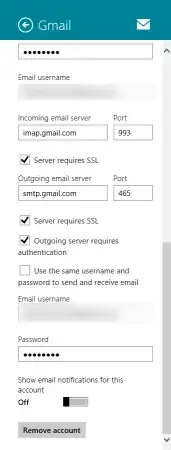
Go to Settings then Accounts then Click on the account you want to delete, scroll all the way down on the accounts settings page, and click on the remove account button

Journeyman Geek
- 127,463
- 52
- 260
- 430
-
I think its same as Win-XP & 7, am i right ? – Lucifer Oct 27 '12 at 10:21
-
Hmm, Windows XP and 7 didn't have a metro/modern ui mail app ;p – Journeyman Geek Oct 27 '12 at 10:27
-
wow, this is really nice feature. – Lucifer Oct 27 '12 at 10:32
-
being able to remove accounts? I'd consider it *essential* – Journeyman Geek Oct 27 '12 at 11:07
-
No, i mean its new look – Lucifer Oct 27 '12 at 11:08
-
Is there any other way to open that besides WIN-C? Just curious, as there should be a method with the mouse. Thanks for the solution, too. – Xonatron Sep 05 '13 at 17:56
-
you can swipe the right edge. I just find win-c to be so much easier – Journeyman Geek Sep 06 '13 at 00:15