1

For a video game, I'm making an ascii map of 1s and 0s which the program makes a 3D labyrinth out of. This is obviously not fun to edit (100x100). To make it easier, I tried setting up Word's autocorrect feature to replace all zeros with blue highlighted zeros so I could see the map better. It does this, but for some reason it's adding a newline every time it makes a replacement, which completely counteracts the benefit by making me have to backspace every time I add a character.

Does anyone know why it's doing this, and how to stop it?

Or if anyone could just recommend a better way of editing grids of 1s and 0s, that'd be great too.

fixer1234
  • 27,064
  • 61
  • 75
  • 116
temporary_user_name
  • 1,127
  • 5
  • 14
  • 26

2 Answers2

1

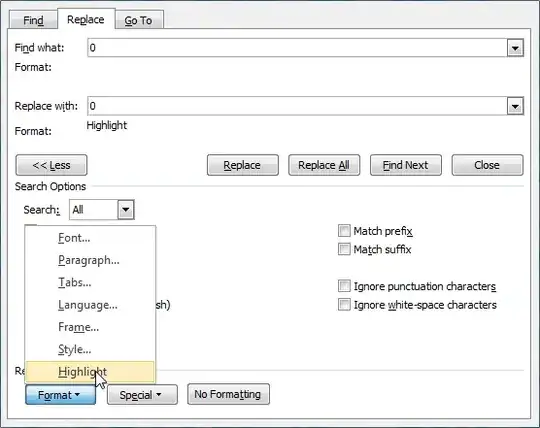
Auto-correcting a 0 doesn't really work for me as it will only auto-correct a 0 surrounded by spaces. But I cannot reproduce the line break either. What you can easily do is to do a search and replace with formatting, though. This won't change zeroes to highlighted immediately, but you could simply apply it a little frequently, then.

enter image description here

But to address your second question: For editing a grid of zeroes and ones I'd probably just use a bitmap image and use Paint, Paint.NET or whatever is appropriate. Then a simple script could convert the image into the necessary text file of zeroes and ones.

Joey
  • 40,002
  • 15
  • 104
  • 126
  • your first suggestion is good but there is no need to replace you can simply search for 0's and highlight all results – Danny Oct 30 '12 at 23:13
  • Mh, that would be easier still, I guess :). I'll test once I'm at work since.y computer is currently upgrading to Windows 8. – Joey Oct 31 '12 at 06:16
0

How about Excel? Use conditional formatting to give zeroes a dark background, or whatever you'd like. Set column widths to something very small, maybe 2.5, so as to get a roughly square grid. As a bonus, it'd be much easier to insert a column.

Add a 101st column that concatenates each of the preceding 100. To output your data, copy this column and paste it into a text editor.