1

Windows reserves some memory for it's internal use which is not normally allocated to applications. This reserve is seen most easily if you run without a page file or limit the pagefile to relatively small size (such as 3GB). Windows will allocate primarily RAM up to the limit, fill up remaining free space in the page file (if any) and issue a low memory warning when there is no page file space left and the allocated RAM limit is exceeded.

The limit appears to be a percentage of the total system RAM. Windows 7 x64 limit is discussed here and methods for circumventing the "low memory warning" is discussed here.

Disabling the low memory warning has some advantages - You can use some 600MB more RAM on 8GB machine) But there is a serious disadvantage - When you're out of ram, programs will crash.

How much RAM can you allocate on 8GB Windows 8 x64 before you get the low memory warning? Is it possible to adjust the warning threshold?

Edit: I can't answer this myself as it got closed due to arguing for arguing's sake. However I answered it here: What is the "low memory warning" threshold with 16GB x64 windows?

In short, yes, Windows 8.1 x64 will behave the same way as Windows 7 x64 did. If you're low on Commit limit - Commit charge, a fairly large percentage of RAM is still kept available if at all possible. This is done by moving more things into pagefile.

What is the "low memory warning" threshold with 16GB x64 windows?

Barleyman
  • 310
  • 2
  • 5
  • 13
  • 5
    Do you have any sources for this 25% claim? It sounds pretty crazy to me and I haven't been able to find any source to back this up using the obvious search keywords. – David Schwartz Nov 05 '12 at 16:20
  • @DavidSchwartz: he seems to refer to system-memory, the kind of ram the OS itself needs to _run_. i doubt that windows8 will give up ram of something it needs to breathe :) – akira Nov 05 '12 at 16:21
  • 3
    The title sounds silly to me. How can apps possibly use *all* the installed memory? Where would the OS go? – Karan Nov 05 '12 at 16:25
  • The Windows 7 machine I'm sitting in front of right now has 8GB of physical RAM and only 41MB free. So roughly 99.5% of RAM is being used right now. – David Schwartz Nov 05 '12 at 16:25
  • @DavidSchwartz: no, you are seeing a number the OS is telling you about available ram. that is: minus the part that is reserved by the OS itself (drivers, graphics, kernel etc). – akira Nov 05 '12 at 16:28
  • @Karan: exactly. – akira Nov 05 '12 at 16:29
  • @akira: No, I'm talking about the amount of RAM that is *unused*. It's 201MB now. 3.7GB is process private mappings. 1.7GB is clean file maps. 300MB is shared mappings. 760MB is allocated from the paged pool. 418MB is allocated from the non-paged pool. 84MB is page table entries. 1040GB is used by ReadyBoost. And so on. Right now, 201MB of the 8GB is free, about 2.5% – David Schwartz Nov 05 '12 at 16:30
  • @DavidSchwartz: then your comment to Karan's comment is a bit missing the point. The OS is obviously using RAM, the more the better. Unused RAM is useless. And it is clear that the overall usage might be 100%. But a single process is not able to push the kernel and other areas covered by system drivers etc out. And thats essentially what OP is asking for. – akira Nov 05 '12 at 16:35
  • @Karan I think it's fine, the OP's intent is clear. "Can applications use all of the memory in Windows 8 other than that which is already in use by the operating system itself" would be a pretty awkward title, and wouldn't help anyone but the most literal-minded readers. – Pops Nov 05 '12 at 16:37
  • @LordTorgamus: nope, I think that OP wants exactly that: use ALL of the RAM for a process, including the RAM for the kernel ("builtin limit"). – akira Nov 05 '12 at 16:38
  • @akira: That would make perfect sense if the OP hadn't mentioned that "25%" number as if was some hard-coded constant in the OS's memory allocation logic. – David Schwartz Nov 05 '12 at 16:40
  • @DavidSchwartz: 25% of 4gb (32bit os) is just the amount of RAM that was reserved by the 32bit kernel (even in Windows XP). Thus, I think that OP confused that by "oh, its 25% of the RAM" with the situation today. It is not the case that my system uses 4gig of my RAM to handle OS tasks :) – akira Nov 05 '12 at 16:42
  • @akira: That's as good a guess as any. In that case, the answer is that most 32-bit applications are still limited to 3GB or 4GB of *virtual* memory per process. And 32-bit operating systems are still limited to a bit less than 4GB of *physical* memory. – David Schwartz Nov 05 '12 at 16:43
  • @Barleyman - There is no such limit. Its not cleaar what you want to actually know. – Ramhound Nov 05 '12 at 17:43
  • @David, others: See link for ref. 25% memory limit is there and you can test it for yourself if you have plenty of RAM installed. – Barleyman Nov 06 '12 at 08:23
  • @All: Set pagefile to 2GB and load up your memory. There's a 25% chunk of RAM that will not be used for apps. You will get low memory warning "close apps x y z" when you get close to the limit. If you disable the warning, on 4GB system OS will refuse to allocate RAM for apps from the last 1GB and apps will crash. If you have 8GB of RAM, you can "spill over" to 6-7GB area temporarily but OS will scale "in use" amount back to <6GB if there is available page file. – Barleyman Nov 06 '12 at 08:46
  • 1
    @Barleyman: That question was about the case where there's no page file. Windows cannot overcommit physical RAM without a page file. The solution to that problem is very simple -- you need a reasonably-sized page file. Otherwise, Windows would fail horribly if applications dirtied pages up to their commit limits. The issue is that while the RAM is not in use this second, Windows has already promised it to applications. Without a page file to cover its checks, it can't write any more. (OSes other than windows have this same issue. It's inherent in modern memory management.) – David Schwartz Nov 06 '12 at 11:10
  • @David, it's not "overcommitting" if you get low memory warning when you have in fact plenty of unused memory. That's the whole point here. System is saying it does not have any memory available while in fact it does have plenty left. The threhold is also a percentage so somehow 8GB machine needs 2x space for "OS" to breathe compared to 4GB machine. Does W8 change the low memory warning limit value or does it not. If it does, what is the new value? – Barleyman Nov 06 '12 at 11:59
  • @Barleyman: It is. It has plenty of unused memory, but that memory is already committed. Yes, it has plenty of memory left, but it can't use it because it has already promised it to applications that might never touch it. This is inherent in modern memory management schemes. Applications make requests that the OS can grant or deny and then maybe use the memory they've requested later and maybe don't. (Read my answer, please.) – David Schwartz Nov 06 '12 at 12:02
  • @David, The moment where low memory warning kicks in, there is plenty of RAM on a box with 8GB memory available to be committed. After all, windows can "overallocate" into the memory between 6 and 7GB. It just doesn't like it, hence the warning. The "promised to be committed" amount in 16GB machine becomes truly ridiculous (4GB) as it's not tied to actual use but into a fixed percentage hard-coded into the system. – Barleyman Nov 06 '12 at 12:11
  • @Barleyman: Windows won't overallocate without sufficient backing store. If it did, it might be forced to forcefully terminate processes when they access memory they've already allocated. Windows won't write a check it can't cash. Sure, there's still lots in the account. The problem is that Windows has already written checks. Without a "reserve" (which is what the page file provides), Windows would have to overcommit and risk spectacular failure, which it won't do. This is why a page file is very important even if it's never touched. – David Schwartz Nov 06 '12 at 12:13
  • @David, I happen to think it's "wrong" to grow this "backing store" without upper limit, which is what happens with W7 x64. On this machine right now I have 6.2GB "in use". The system constantly reallocates RAM into pagefile to keep "in use" at 6GB mark. (down to 6.1GB now). There's 600MB cache, 19MB kernel, 8MB driver allocation and 1.9GB unallocated. That cache does not get reallocated to application use in low memory condition, incidentally. – Barleyman Nov 06 '12 at 13:01
  • The amount of page file is the upper limit. But I definitely agree that there's room for improvement. My general advice is not to mess with things -- trust the OS developers to get things right in the typical cases. The growth of RAM sizes and the switch to SSDs is, at least partially, forcing a change back to considering backing store a scarce resource. – David Schwartz Nov 06 '12 at 13:09
  • No, the upper limit is 25% of the total RAM. Somehow you seem to have trouble accepting that Windows is by design not able to allocate a portion of he RAM to applications. You can increase page file size and still not use the last quarter of the RAM, this does not change. Another reference claims the limit is 80%, not 75%. – Barleyman Nov 06 '12 at 13:44
  • @Barleyman: You see conflicting claims about what this limit is because there is no such fixed limit. It's triggered by a shortage of virtual memory, not physical memory. I have explained why you can have lots of free RAM but nevertheless still be low on virtual memory. Windows also has to balance keeping clean pages in RAM to prevent a page (of a file) being read right back from disk after being evicted from RAM. – David Schwartz Nov 06 '12 at 13:49
  • Both of the links I present come around to the same 20% figure, note how he says he has "2GB+ free memory" in the 1st one. – Barleyman Nov 06 '12 at 14:38

2 Answers2

13

This behavior is inherent in modern memory management. It will occur on pretty much every modern virtual memory OS if the amount of available backing store (pagefile or swap space) is not sufficient relative to the amount of physical memory.

If you look at modern applications on a Windows system, you can see that their working set (the physical memory they are using) will tend to be a bit less than their commit size (the virtual memory the operating system has promised them).

For example, on my desktop Windows machine, the browser I'm using to type this answer is using 207MB of RAM, but the operating system has already promised it 280MB of virtual memory. This means that at any second, the browser can consume 280MB of virtual memory without having to ask the operating system for permission, just by accessing mappings it already has. The operating system either needs to provide the process with this memory, or it has to forcefully terminate it, failing to honor commitments it has already made.

With no backing store at all, with just physical RAM, 73MB of additional RAM would have to be reserved for this application. Even though the browser is only using 207MB of RAM, it can balloon to 280MB just by using memory it has already allocated that the operating system has not actually allocated to it yet (just reserved).

If the operating system has sufficient backing store for all its commitments, then it can continue to make commitments. But it not, it's forced into an unpleasant choice. It can tell applications that it cannot make any more commitments, even though there's plenty of free RAM. Or it can grant application commitments, but then have to forcefully terminate applications when they go to use resources they've already allocated.

The solution is simple, configure ample backing store. This used to not be a problem. Everybody had giant disks with hundreds of gigabytes. So adding backing store equal to your physical memory wasn't a problem. However, recently machines with small SSDs are becoming common. So this is becoming an issue again.

Note that the page file need not even be touched for it to solve this problem. The operating system just needs to know it's available in the unlikely case that a significant number of commitments be called in at the same time. This almost never actually happens -- it's kind of like a run on the memory bank.

David Schwartz
  • 61,528
  • 7
  • 100
  • 149
  • 1
    Increasing page file size will of course allow more memory to be committed but it won't change the low memory warning threshold or make W7 x64 use last 25% of RAM for applications. WRT pagefile size, on HDD 2GB is already a lot. 3GB is borderline useless if it's actually accessed. "1.5x RAM amount" is ancient wisdom from WfWG era, hardly valid for today. Mark Russinovich article here discusses that. Note also Pavel's comment VRT Vista virtual memory design choices. http://blogs.technet.com/b/markrussinovich/archive/2008/11/17/3155406.aspx?PageIndex=1#comments – Barleyman Nov 06 '12 at 11:53
  • 1
    The low memory warning threshold is based on available virtual memory. So adding more page file space *will* change when the low memory warning appears. And, as I wrote, the point is not that Windows will actually use the space but that Windows will be able to commit it to avoid a "run on the bank", allowing it to avoid refusing allocations and make more efficient use of physical RAM. With insufficient backing store, you can wind up with plenty of free physical RAM and no way to use it because it's already committed to applications that will actually never use it. – David Schwartz Nov 06 '12 at 11:58
  • No, the low memory warning is tied to the amount of RAM actually in use. Increasing page file _will not_ change this behavior. System with 4GB pagefile will not allocate any more RAM at all to apps compared to system with 2GB pagefile, you will still get low memory warning with exact same amount of unallocated RAM. In other words, you may be using 95% of your virtual memory with big pagefile but you get low memory warning the instant system is forced to commit more than 75% of RAM for apps. There is another, higher threshold where windows actually refuses to allocate any memory. – Barleyman Nov 06 '12 at 12:03
  • @Barleyman: Do you have a reference for that claim? That conflicts with my observations and every source I can find says that this is only an issue for systems with no (or almost no) paging file. – David Schwartz Nov 06 '12 at 12:08
  • This machine where I'm writing this for example. Removing page file just makes the behavior explicit. "Why are you complaining you do not have memory when there is still 3GB reserve left?!". With pagefile it becomes a bit more fuzzy but the same behavior persists. Most people create huge pagefiles which will make the system unusable long before they'd see the low memory warning. With reasonable pagefile (like 2GB) you will run into the same behavior when system cannot move more "stuff" into the pagefile anymore. Which is what I wrote in the OP. – Barleyman Nov 06 '12 at 12:50
  • 1
    @Barleyman: The operating system is complaining that it does not have memory when there is still 3GB reserve left because it is low on *virtual* memory. This is because the operating system made commitments to applications that it may need to honor in the future, even if the applications aren't using that memory yet. For example, if a program makes a private, modifiable mapping of all of a 4GB file, the operating system must reserve 4GB of *virtual* memory in case the application writes to every byte of that mapping. No RAM is needed yet though and the application may never write at all. – David Schwartz Nov 06 '12 at 12:58
  • Yet this 3GB of RAM will not get utilized regardless of your pagefile size. Or 2.4GB if we take 80% to be the right figure, not 75%. You're essentially saying "There is a portion of RAM which can grow without upper limit that will not get used but it's OK because we can use pagefile" Ergo: Does Windows 8 allocate larger amount of system RAM to applications when necessary or does it keep 20% (or 25%) in "reserve" regardless of installed memory size. – Barleyman Nov 06 '12 at 13:54
  • 3
    I honestly don't understand what you're saying at this point. There is no RAM that doesn't get utilized (except for the interrupt emergency pool which is typically less than 100MB). Yes, the system has to balance clean pages against dirty pages, application memory against page cache, and so on. And if the system has insufficient page file, it may be unable to use RAM effectively. Nothing, however, is broken and so there's nothing to fix. Most likely, what you are seeing is memory used as a clean page cache. You don't want to shrink that or you get lots of hard page faults. – David Schwartz Nov 06 '12 at 14:18
  • 1
    @Barleyman Perhaps this analogy will help: You have lots of money in the bank (RAM), but you also have a bunch of checks that haven't been cashed yet (allocation of virtual memory). Even though you have lots of money sitting in the bank doing nothing (free RAM), you can't write any more checks (permit mappings that might require backing store in the future) without risking bouncing a check (having to forcefully terminate an application in the future). – David Schwartz Nov 22 '15 at 02:25
  • Nope. And I have no interest in arguing about it. The answer to my question is "yes it does". In Windows 8.1 x64, 20% of RAM is (still) left in a "buffer" which system will temporarily allocate into while it's moving "stuff" into page file. But if the page file is exhausted, a single byte of memory allocated into this last 20% will give you low memory warning. I had a 16GB work laptop for a while but never got around to checking if it would give low memory warning with 3.2GB free ram as expected. I have also not checked if Windows 10 still refuses to use the last 20% or RAM. – Barleyman Dec 03 '15 at 16:45
  • @Barleyman No, the answer to your question is "no it doesn't". The "low memory" warning has absolutely nothing to do with available RAM. In fact you can have far more than 20% of "available" RAM and still get the warning. It has to do with commit charge vs. the commit limit, exactly as David said. It is actually quite easy to run a system's memory usage well past your mythical 80% point - try the `testlimit` tool from sysinternals.com. Try running several instances of it with the -d option and plenty of pagefile space. n.b.: The article at http://halflight.com.au/ is just wrong about this. – Jamie Hanrahan Jan 30 '16 at 23:24
  • Around and around it goes. I actually amended the "what's the warning limit for 16GB machine" question to explicitly mention CC vs CL so you cannot dodge the question that way. Increasing page file does not change the RAM reserve threshold. But thank you very much for downvoting the issue. I'll be upgrading to 16GB in near future so I can check the behavior myself finally. Feel free to downvote results for that experiment as well. – Barleyman Feb 01 '16 at 11:00
  • 1
    @Barleyman What is a "RAM reserve threshold" exactly? – David Schwartz Feb 01 '16 at 11:22
  • @DavidSchwartz Well, that's the question, isn't it? Please do the experiment proposed in the 16GB low memory warning question and let us know? – Barleyman Feb 01 '16 at 18:44
6

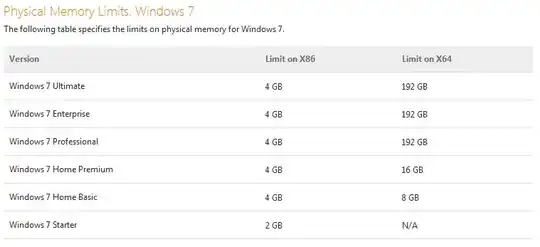
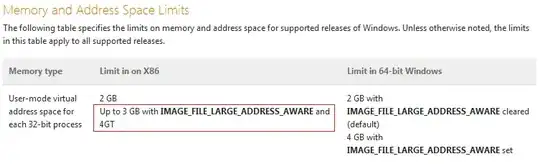
From Memory Limits for Windows Releases:

1
2
3

4
(See full table for further details about user and kernel-mode virtual address space limits etc.)

That bit highlighted in red is probably where you got that idea of a 25% limit from. Yes, only ~3 GB of RAM out of 4 GB installed is available to 32-bit processes on 32-bit versions of Windows, and this hasn't magically changed with Windows 8. As for why this is, I'm not going to bother repeating all the articles on the internet that have already explained this in detail, including Jeff Atwood's Dude, Where's My 4 Gigabytes of RAM?

Karan
  • 55,947
  • 20
  • 119
  • 191
  • http://technet.microsoft.com/en-us/sysinternals/ff700229 good tool to see how the RAM is used. – akira Nov 05 '12 at 16:36
  • These are limits specific to 3GB/4GB. His question was clearly about a 25% limit that scales with the amount of RAM you have. So this can't be what the OP was asking about. "That was fine when Vista was designed, when machines had 1 GB of total memory, but is pretty daft for today's 8 GB machines." – David Schwartz Nov 05 '12 at 16:38
  • @DavidSchwartz: Then he needs to specify where he got this info. from, as you yourself stated above. It's entirely possible he read something and then extrapolated it without hard evidence about the limit on modern machines with oodles of RAM. – Karan Nov 05 '12 at 16:41
  • I agree. We can only guess what the OP was thinking. There is no 25% limit. There are virtual memory limits that apply to 32-bit processes and physical memory limits that apply to 32-bit operating systems. (And the other, harder to hit, limits in the table above.) – David Schwartz Nov 05 '12 at 16:41
  • @DavidSchwartz: Yup, the only reasonable explanation I could come up with for that number was the bit highlighted above. ~1 GB unusable out of 4 might imply there's some sort of hard-coded 25% limit to someone who doesn't know the reason. – Karan Nov 05 '12 at 16:44
  • That actually makes sense. Maybe he heard that only 3GB out of the 4GB *virtual address space* was available to a 32-bit process and thought that had something to do with physical memory. Of course, it has nothing to do with physical memory at all and is purely a virtual memory limit. (Although that makes his comment about using the pagefile inexplicable, but who knows.) – David Schwartz Nov 05 '12 at 16:45
  • @Karan: You are absolutely wrong and this information posted above adds zero information. This memory allocation behavior applies to x64 system. Nobody cares about 32bit limits, they are well known. See here for reference of this 25% behavior under 12GB system http://superuser.com/questions/289302/windows-7-page-file-disabled-12-gb-ram-2-gb-ram-free-and-your-computer-i – Barleyman Nov 06 '12 at 08:20