7

For me the Windows 8 Start Screen is just a great bit version of the old Start Menu, but unlike the Start Menu, it doesn't seem to order programs by frequency of use?

Consider the following:
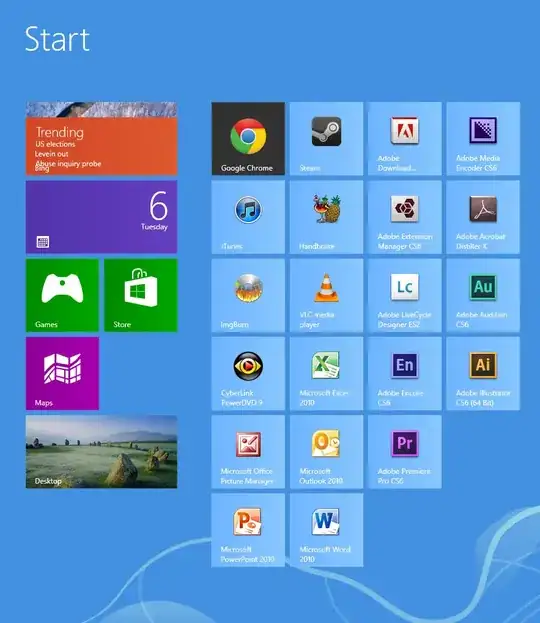
While I DO use Chrome, Steam, and iTunes a lot. I've never ran Adobe Media Encoder, nor Adobe Extension Manager, nor Acrobat Distiller, or indeed most of the things on that list!

Is there a way to change sorting to "most frequently clicked on"? Or perhaps even create FOLDERS in which to group items (e.g. "Adobe Apps" or "Games" or "Microsoft Office"?).

Dragging them one at a time takes an age!

Django Reinhardt
  • 4,434
  • 8
  • 52
  • 85

3 Answers3

5

No, you can't. There is no inbuilt option and no app available yet which will let you do the purpose on the Start Screen. You can obviously get start menu replacements for Windows 8 which have the sort by most frequently used feature.

To create groups, check out this link.

Elmo
  • 14,555
  • 17
  • 52
  • 90
2

The tiles stay still by design - and you can organise them into groups which can be moved as a whole (when zoomed out) - simply drag onto the bar between two groups, or to the right of the right most group to create a new group.

Rowland Shaw
  • 3,996
  • 8
  • 38
  • 57
  • Sweet! That's something at least. I wish I could move the Groups I've created, though – Django Reinhardt Nov 06 '12 at 19:26
  • @JohnnyW You can. There are [other questions](http://superuser.com/questions/501770/windows-8-start-screen-moving-groups) on here that explain how to do this. – Ben Richards Nov 06 '12 at 19:36
  • 1
    @sidran32 Wow! Great job on spotting the question I created after writing my comment above :) – Django Reinhardt Nov 06 '12 at 19:38
  • 1
    @JohnnyW you can move the groups - just zoom out as I mentioned in the answer (using the [-] bottom right, or pinch to zoom out if you have a touch device) – Rowland Shaw Nov 06 '12 at 19:41
  • 1
    @JohnnyW Haha. Admittedly, I didn't check the author of that question. However, it could be useful to others perusing the site. ;) – Ben Richards Nov 06 '12 at 19:51
1

You could get back the old start menu which would have this behavior. You can do this by installing a 3rd party app such as:

Bryan Denny
  • 1,233
  • 2
  • 10
  • 17