3

I bought a new monitor 24'' to add to my 2 other monitors (24'' and 26''). They're all 1920*1200, and are all recognized individually, and 2 at the same time can always work (through HDMI et DVI1). My graphic card is an ASUS HD6950 2GB and it has 2 mini Display ports as well as 1 HDMI and 2 DVI. I tried to connect my 3rd monitor through DVI then through the mini display with an adaptor, and in both cases it's recognized but when I try to get to activate the 3rd screen, here's what I get:

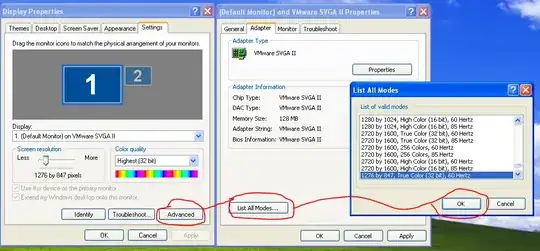
  • In Windows resolution config Windows error
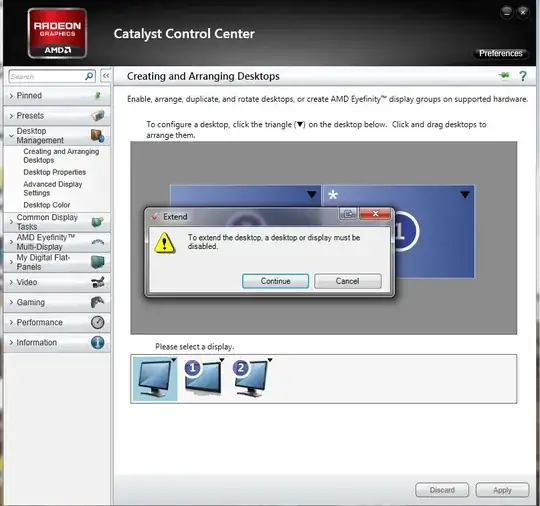
  • In Catalyst Control Center Catalyst error

Thanks for your help!!

Nabab
  • 153
  • 1
  • 8
  • Look into Eyefinity that should allow you to support 3 monitors. http://superuser.com/questions/122885/how-to-use-eyefinity – Ramhound Dec 05 '12 at 18:32

1 Answers1

3

With that card, you can't use both DVI ports and the HDMI at the same time.

Also, if you want to use mDP to a DVI monitor, then you need an "active" adapter.

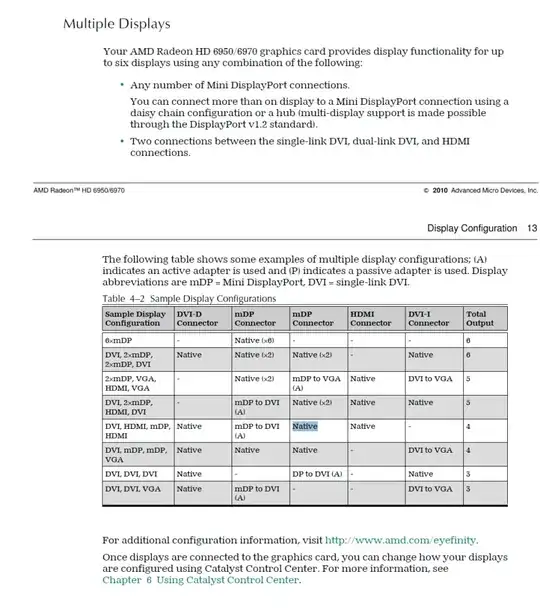
From the manual of a version of your card, here's a chart of acceptable display configurations (second one from the bottom is the 3x DVI monitor configuration your aiming for):

enter image description here

More info here: Active vs. Passive DisplayPort adapters the truth

Including this tid-bit:

Eyefinity requires an ACTIVE adapter to enable a third monitor on HD 5000 cards. Passive will NOT work, except for the first two monitors on the eyefinity 5 and eyefinity 6 cards. For the other three/four monitors, active is still required.

Ƭᴇcʜιᴇ007
  • 111,883
  • 19
  • 201
  • 268
  • 2
    Brilliant! Thanks a lot, I wouldn't have understood this chart alone anyway :) I've just ordered an active adaptor (and found on Amazon plenty of comments from people with the same problem). – Nabab Dec 05 '12 at 19:08