I have recently installed Windows 8. But now in Windows 7, when I move windows, a line depicting the outline of the window shows the current position of the screen when dragging them. This is not like earlier, when the entire windows used to move. I really don’t like the way it looks now. Can anyone please help me?
Asked
Active
Viewed 709 times
3


-
Possibly. But I'd have to say that the answer here is complete with pictures to help new users better. – Hele Aug 05 '14 at 05:18
-
it was mostly just to note it to the mods, so perhaps they can decide which one is better, and/or if they should be merged. The flag may also just languish for eternity, with no change. :) – Ƭᴇcʜιᴇ007 Aug 05 '14 at 14:02
1 Answers
7
You can re-enable full-drag through the Control Panel:
(1) Open the Control Panel and click "System and Security".
(2) From within the System and Security section, click "System".
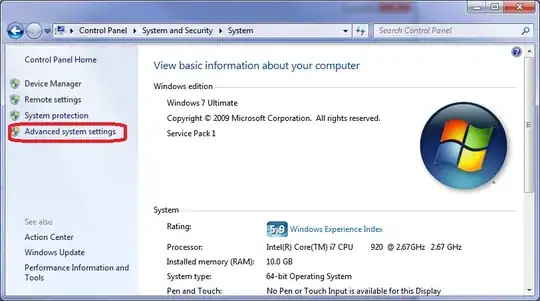
(3) From within System section, click "Advanced system settings".
(4) After the UAC prompt, click the "Settings" button in the Performance section of System Properties.
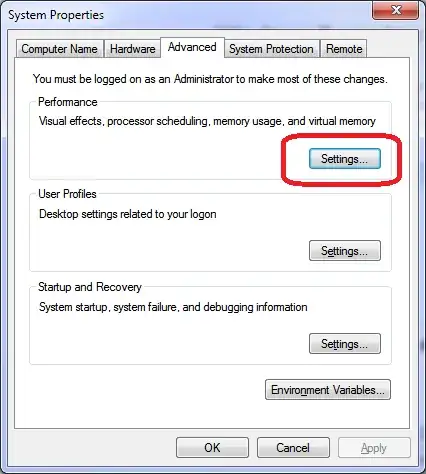
(5) Click "Show window contents while dragging", then click "OK".

Nicole Hamilton
- 9,935
- 1
- 21
- 43
-
1Thanks a lot. That worked 100% for me. I'll vote you up as soon as I have enough credits to do so. :) – Hele Jan 13 '13 at 05:59
-
1
-
2
-
Great answer, although all I do to reach the same dialog is type **app** in Win7's Start Menu search box, and press Enter when **Adjust the appearance and performance of Windows** comes up. Much faster, wouldn't you say? :) – Karan Jan 14 '13 at 02:30
-
@Karan Only if you already know that the magic word is "appearance". What I've shown is the how you get there just by drilling down the Control Panel, following the way it's organized. The organization is intended to be "discoverable" this way. Your suggestion works best if you've already discovered how things are organized and know where to find what you want. – Nicole Hamilton Jan 14 '13 at 02:46
-
Oh yes, which is *precisely* why I said your answer was great (and meant it! :) My tip was just that - a tip for someone reading this page who might use it to get there faster. It wasn't meant to devalue your detailed answer in any way. – Karan Jan 14 '13 at 02:51
-
@Karan Okay, thanks. I can agree with that. Hope you also have a great new year ahead. – Nicole Hamilton Jan 14 '13 at 03:31