3

I use Sophos Antivirus on my Mac (running Lion 10.7.5) and I am not able to change Update Settings as it is greyed out. I clicked on the Lock icon on the bottom portion, entered my password (administrator account) and still I find it greyed out. Here is the image for reference.
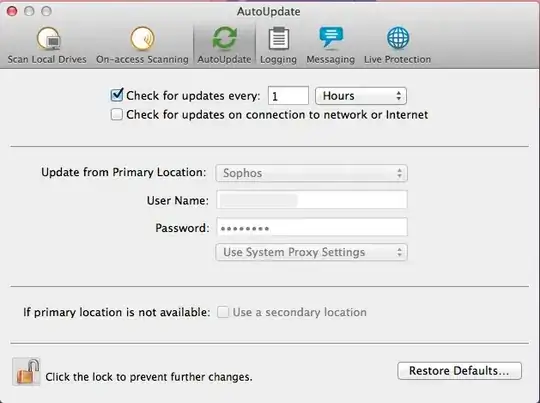
Autoupdate settings greyed out

What should I do that will allow me to change these settings?

thandasoru
  • 215
  • 1
  • 9

1 Answers1

0

It looks like you have to change a configuration file, specifically iconn.cfg. Inside this file try changing the line AllowLocalConfig = 0 to AllowLocalConfig = 1 (under [PPI.WebConfig_Primary] section).

On macOS, it's located in:

  • /Library/Sophos Anti-Virus

On Windows it's in (depending on the operating system):

  • \Program files\Sophos\AutoUpdate\Config
  • \ProgramData\Sophos\AutoUpdate\Config

Source: Edit local config - Endpoint 9.5/9.7.

kenorb
  • 24,736
  • 27
  • 129
  • 199
user1301428
  • 3,325
  • 11
  • 37
  • 55
  • But can you tell me where this iconn.cfg file resides in Mac OSX Lion? The source link you have given has the answer for Windows OS – thandasoru Jan 15 '13 at 03:40
  • I'm not using Sophos so I might be wrong, but try looking for `Library/preferences/com.sophos.sau.plist` on a Mac – user1301428 Jan 15 '13 at 07:45
  • The plist was found under /Library/Sophos\ Anti-Virus/ but even after adding AllowLocalConfig 1 I could not get the auto update settings enabled :-( – thandasoru Jan 17 '13 at 04:52
  • Then probably you will have more luck contacting their support.. – user1301428 Jan 17 '13 at 07:37