I've recently upgraded to Outlook 2013 (it's been a bit underwhelming), and it looks like somehow my AutoArchive setting was turned off. No problem, I turned it back on with File | Options | Advanced | AutoArchive Settings... | Run AutoArchive every X days. However, I'd like to go ahead and run it right now. That used to be possible with the Tools | Options menu in 2007, but I can't find it in 2013. Am I blind?
Asked
Active
Viewed 8.5k times
3 Answers
34
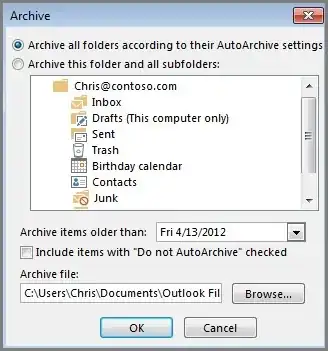
Is the manual archive option what you're looking for? If so, it's available from File / Info / Cleanup Tools / Archive:


Karan
- 55,947
- 20
- 119
- 191
-
NOTE: this will NOT respect all "auto archive" settings, but will override it with whatever date you have set here. To run auto archive with all your settings and per folder overrides, see the answer from @Mike. – Sergey Jun 29 '17 at 16:34
8
I'm sure you already found the answer to this.
But for others that may be looking.
FILE -> MAILBOX CLEANUP -> MAILBOX CLEANUP -> AUTO ARCHIVE
This will start the process immediately.

Oliver Salzburg
- 86,445
- 63
- 260
- 306

Mike
- 81
- 1
- 1
-
Is that for an older version of Outlook? That is not quite right for Outlook 2013. – Jan 06 '14 at 16:39
-
Possibly - on Outlook 2013 it's File, Cleanup Tools, Mailbox Cleanup and then the AutoArchive button – munrobasher Aug 04 '15 at 07:57
2
Go to File > Cleanup Tools > Archive. Check settings and click the OK button. This worked immediately for me in Outlook 2013.
I first configured the default archive settings in Options > advanced > Auto Archive Settings. But you can do that from the above path too. You can also right click on the account inbox and select Properties and there will be a Auto Archive tab.

Manu
- 2,981
- 9
- 50
- 73

Liam O'Donovan
- 21
- 1