On the PC, I use Camtasia to record various screencasts. Is there something similar for the Mac?
Asked
Active
Viewed 2,487 times


7 Answers
5
Have you tried the Mac version of Camtasia?
Personally I prefer ScreenFlow.

Chealion
- 25,408
- 8
- 67
- 75
-
Oh, dang, didn't see it. – AngryHacker Oct 14 '09 at 16:05
-
ScreenFlow -> that's the guy! (I doesnt try Quicktime X yet) – Zote Oct 15 '09 at 04:02

3
Theres a myriad of these for Mac, but one that stands out for me is Capture Me, it's free and open source. Not to mention very easy to use:
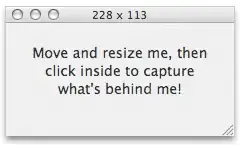
Features:
- Globally floating capture window.
- Record short MPEG-4 QuickTime movies.
- Fast screen captures (uses OpenGL).
- Ability to down scale captures (proportionally or not).
- Save as PNG, JPEG, JPEG 2000, TIFF, or GIFF.
- Adjustable translucency of capture window.
- Several ways to adjust the size and position of the capture (move the window, arrow keys, scroll wheel).
- Nifty capture sound.
- Options to auto-save to desktop, auto-copy to clipboard, etc.
- Barest beginnings of AppleScript support.
- Written with Cocoa - native to Mac OS X.
- Universal binary - Intel, PPC native.


1
QuickTime X will do screen recording, www.screentoaster.com is a free web-based screen recorder, there are lots of screen capture programs for the Mac, ScreenFlow is a very popuar one, but if you are used to Camtasia and like it, Camtasia has a Mac version.

Bob D
- 488
- 1
- 3
- 6
1
Why replacement when there's Camtasia for Mac?

