3

I got a fresh PC with Windows 7. Unaware of things I went straight to "clean-up" my user directory. I deleted all "My *" folders (documents, videos, etc.). I experienced some nasty bug with Outlook that was caused by the lack of "My Documents".

With some magic I was able to recreate the junction point for "My Documents".

I'd like to delete the user and recreate it, but I cannot do it on this machine.

Is there a way to verify that all the default folders are there and the junction points are correct? I want to avoid nasty surprises in the future.

Stefan
  • 133
  • 4
  • 7
    Why are you unable to delete and recreate the user exactly? – Ramhound Mar 11 '13 at 16:08
  • Since you've said it's a fresh install, I'd say just format and start over; only this time don't go deleting stuff willy-nilly. :) – Ƭᴇcʜιᴇ007 Mar 11 '13 at 16:45
  • It's a company pc. I have administrator priviliges though. – Stefan Mar 11 '13 at 16:59
  • Is it possible that the IT guys have preped the PC with Windows 7 via Deployment tool? Is the PC part of the domain? (Check techie007 answer) Are you sure you can be "deleting stuff willy-nilly" on work PC? – Darius Mar 11 '13 at 18:05

3 Answers3

2

Delete the registry key for the profile, reboot, and log in again.

This should cause Windows to rebuild your profile on that PC, and any missing folders.

Before doing this, I would backup any data to another local location (c:\backup) as well as exporting a backup of the registry key just in case.

Here's how to remove the local user profile via the registry:

Click on Start > Run > regedit > ENTER

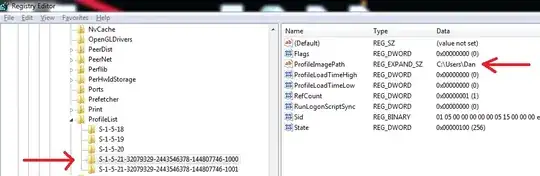
Navigate to the following registry key: HKEY_LOCAL_MACHINE\SOFTWARE\Microsoft\Windows NT\CurrentVersion\ProfileList

Under ProfileList navigate to binary keys like this: S-1-5-21-3656904587-1668747452-4095529-500

On the right side under ProfileImagePath you will see the profile path.

Choose the one with the desired user and delete the long registry key corresponding to your username - it will look like this:

enter image description here

Austin ''Danger'' Powers
  • 6,262
  • 15
  • 44
  • 64
1

Since you say it's a company computer and that's why you can't recreate the user, I'm guessing you're on a domain, using domain credentials to log in.

In that case you don't need to delete/recreate the actual user, just the user's profile on the computer in question:

Ƭᴇcʜιᴇ007
  • 111,883
  • 19
  • 201
  • 268
0

Create a new user, see what all the default folders are on a new user, make sure that they all exist in your current profile. Should be all there is to it.

darylknight
  • 219
  • 2
  • 7