1

I only could find the solution for Windows 7. My problem is, I'm using Polish Programmer's keyboard; it works like English keyboard, except you can input ąęółśćżźĄĘÓŁŚĆŻŹ with deadkey ~ followed by, or ALT together with aeolsczxAEOLSCZX, and therefore I have no need for English layout, so I deleted everything except English region settings with polish keyboard layout: Language settings window But when I press Windows+Space I still get my layout changed to original English: Layout selecting indicator
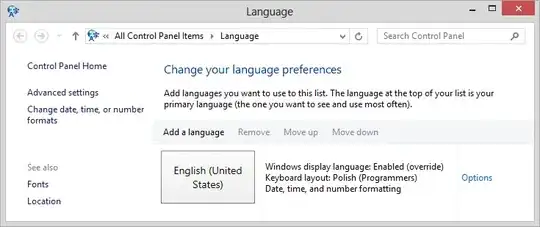
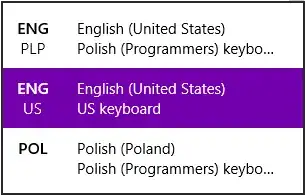
It looks bugged to me, or am I doing something wrong?

  • Wow, two people in relatively quick succession with the [exact same](http://superuser.com/questions/581269/windows-8-2-languages-how-to-lock-keyboard-to-only-one) display and input language preferences - what are the odds?! Anyway, *why* are you pressing Win+Space if you don't need to? Are you really pressing it so often by mistake that it's an issue? Perhaps [changing the language bar hotkeys](http://superuser.com/questions/502647/changing-behavior-of-windows-8-winspace-language-changer) will help? – Karan Apr 12 '13 at 12:30
  • We don't have exact same display and input language preferences :) I want to use English display with Polish input. The other guy(s, as I can see "Polish" in second link as well) just happen to be Pole(s) :). I guess I press the combo accidentally, as sometimes I can't input polish letters only to notice my keyboard layout changed. It's a bit irritating. – Markus von Broady Apr 14 '13 at 10:08
  • Actually you do seem to have the same preference - he too wanted English display language with Polish keyboard layout and Polish date/time/number formatting. :) That aside, did changing the hotkey help? – Karan Apr 14 '13 at 10:55
  • @Karan I press it by mistake all the time. Not sure if it is something in Photoshop or where but I find myself in the wrong mode all the time :-( – Simon Nov 03 '16 at 21:51

0 Answers0