2

I’m running TextMate 2.0-alpha.9419 and experiencing this issue: the editor doesn’t see my method definitions within a class, and won’t let me jump to them via “Go To Symbol”. The only method that TM does recognise is __construct which is hardly useful enough.
enter image description here

I do have the PHP bundle installed.

Is this just something that is missing from the bundle/TM alpha build, or is there a way I can fix this?

slhck
  • 223,558
  • 70
  • 607
  • 592
Arnold
  • 861
  • 2
  • 8
  • 18

1 Answers1

4

You'll need to updated the PHP bundle to add user-defined methods to the symbol list.

Goto "Bundles" => "Edit Bundles"

enter image description here

Select the PHP Bundle & create a new Bundle Setting

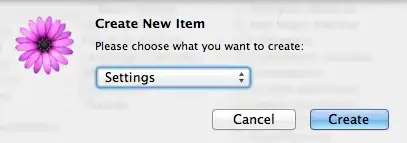
  • ( command + N ) => select "Setting"

enter image description here

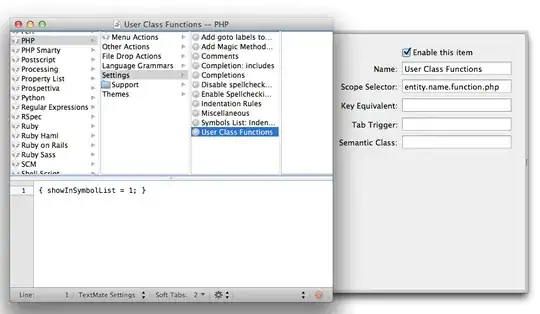
Enter a name, "entity.name.function.php" as Scope Selector, and enter the following setting

{ showInSymbolList = 1; }

enter image description here

Save setting ( command + S ) and close Bundle Editor.

  • You may need to restart TextMate.app and/or clear cache
$ rm ~/Library/Application\ Support/TextMate/Managed/Cache/*

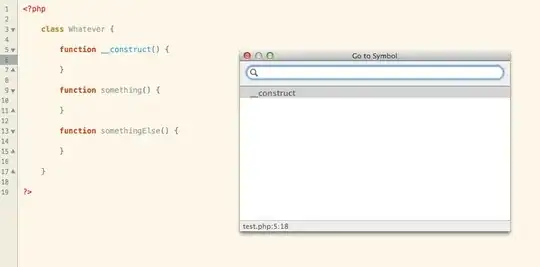
You should now have named functions in your symbol list

enter image description here

emcconville
  • 406
  • 3
  • 8
  • Thank you, this worked perfectly. I’m puzzled though as to why this isn’t configured by default. – Arnold May 16 '13 at 21:15
  • This bundle _is_ configured by default. Remember TM2 is in active development -- so many things will work, then break, then work again. I imagine the author(s) of the PHP bundle are waiting for a beta version before refactoring code. – emcconville May 18 '13 at 01:51