5

Was not using VirtualBox for some time and now found that it stopped working (as usual).

When running, the following error appears
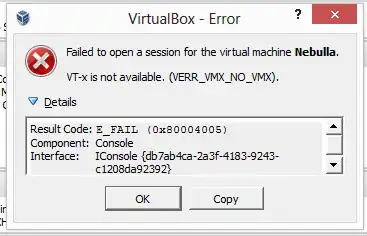
enter image description here

Some details

VT-d is enabled in BIOS

Host system is Windows 8

Version of

Text Version

Failed to open a session for the virtual machine Nebulla.

VT-x is not available. (VERR_VMX_NO_VMX).

Result Code: E_FAIL (0x80004005) Component: Console Interface: IConsole {db7ab4ca-2a3f-4183-9243-c1208da92392}

SOLVED

It was a conflict with Hyper-V. When it is installed, then Oracle Virtual Box can't run 64-bit virtual machines.

Dims
  • 12,244
  • 78
  • 161
  • 252
  • vt-x and vt-d are 2 different things (this is vt-d: http://en.wikipedia.org/wiki/IOMMU). Make sure vt-x is enabled. – magicandre1981 May 30 '13 at 17:54
  • Don't answer your own question inside it. Please, edit question, remove _Solved_ section and answer your own question by providing full answer. Please, use Stack Exchange standard. Thank you. – trejder Sep 06 '16 at 18:49

2 Answers2

1

Even if you have all the virtualization BIOS settings enabled, if you have Hyper-V turned in on Windows Features, VirtualBox will not detect VMX as available.

Use "Turn Windows features on or off", if you are able to remove Hyper-V. If you are unable to live with that, perhaps you can migrate your VMs to Hyper-V.

Andy Joiner
  • 403
  • 2
  • 6
  • 18
0

An efficient way to handle this is described in https://blogs.msdn.microsoft.com/virtual_pc_guy/2008/04/14/creating-a-no-hypervisor-boot-entry/ and it basically creates a boot option for launching your Windows environment without Hyper-V running by using 'bcdedit'.

bcdedit /copy {current} /d "Microsoft Windows – no hypervisor"
bcdedit /set {guid from the previous command} hypervisorlaunchtype off

Once you do that, reboot and you should see a menu at startup that lets you choose to boot with or without Hyper-V enabled. Works on Windows 10.

Larry Smithmier
  • 164
  • 1
  • 1
  • 4