I have been sent a massive pdf with over 500 pages, of which I only need the final 30 or so. Is there a way I can save just the last pages as a seperate pdf document?
Asked
Active
Viewed 9,281 times
1

-
Check my out the answers over at [AskUbuntu](http://askubuntu.com/questions/221962/how-can-i-extract-a-page-range-a-part-of-a-pdf/282453). The Q&A orimarily concerns Linux and Ubuntu but some of the tools shown there are cross-platform and should work on Windows as well (e.g. `pdfsam`). – Glutanimate Jun 15 '13 at 12:17
-
@Glutanimate My god that looks tough. I thought there would be a feature similar to printing, where you can just select a range of pages – John Jun 15 '13 at 12:21
-
1Well, it's Linux, so some things are admittedly tougher than on other platforms. Another method that just came to my mind is using a [PDF printer](http://superuser.com/questions/102302/need-a-fast-reliable-pdf-printer) to output a PDF file. With this I suppose you would be able to set the page range in the same manner as you would when printing a file. But I fear I can't help you with setting it up since I've never used one before. Other users might be able to do so, though. To anyone reading this: Feel free to compile an answer based on my suggestions (or other ideas for that matter). – Glutanimate Jun 15 '13 at 12:28
-
Duplicate of [Is it possible to delete some pages of a pdf document?](http://superuser.com/questions/517986/is-it-possible-to-delete-some-pages-of-a-pdf-document), http://superuser.com/questions/446674 and many more. – Karan Jun 15 '13 at 17:57
2 Answers
1
The easiest way is to install a PDF printer like PDFCreator (As Glutanimate already mentioned)
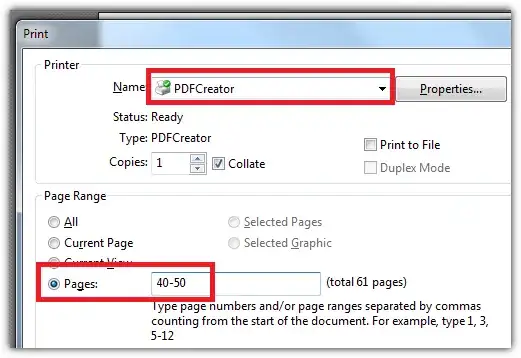
Example with PDF-X Change Viewer and PDFCreator
- Download & install a PDF printer (there are many alternatives which work similar)
- Open your PDF with your favority software like Adobe Reader or PDF-XChange Viewer
- Open the print dialog
- Choose your newly installed Printer
- Head down to the section where you choose the pages you want
- Click print and you will be asked for a destination and file name

nixda
- 26,823
- 17
- 108
- 156
-
I just tried doing the same in Foxit Reader and it works in the same way using its inbuilt PDF printer. You could try looking in your reader print menu for a similar option. – BrianA Jun 15 '13 at 14:54
1
This can be done using the commandline tool PDFtk (= the PDF Toolkit).
Example:
pdftk A=in1.pdf cat A130-160 output out1.pdf
As suggested in other answers, "printing" the required pages to a PDF printer is a good option. My favorite for this is doPDF.
Edited:
In case you don't like commandline tools, you can control PDFtk using Dirk Paehl's GUIPDFTK:
Just enter the page number range as "CAT from:" and "CAT to:".

Axel Kemper
- 3,713
- 2
- 20
- 21