Question pretty much stands for itself.
To just right click always on top and have window in focus all the time. (on top of other windows no metter if you click somewhere else, on desktop, taskbar, explorer, etc..) Some useful tool, or some other suggestion.
Asked
Active
Viewed 3.5k times
12

malakrsnaslava
- 2,753
- 4
- 23
- 37
1 Answers
13
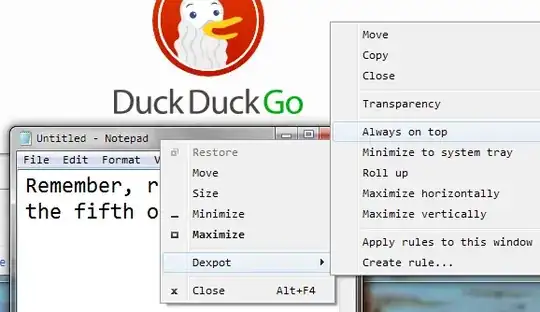
Windows 7 can't do that. But you can do it with a help of a program which is called Dexpot. Go and download Dexpot which is actually a program for virtual desktops. After you downloaded the program right click on a window, select Dexpot and choose always on top. There is also a option to make a window transparent.
Here a screenshot:
 ,
,

Devid
- 6,299
- 13
- 55
- 74
-
Erm, it's not working for me. I've installed dexpot, I see the dexpot menu (as in the screenshot) but the "Always on Top" does nothing, it never seems to select. – theonlygusti Dec 31 '14 at 14:47
-
Wich OS are you using, I have tested it on Vista (32bit), 7,8 and 8.1 (32 and 64)? – malakrsnaslava Jun 09 '15 at 07:43