-1

Currently my task manager is showing me that i'm using 50% of my memory. However once i switch to look at it by user accounts it's showing me using about a half of that :
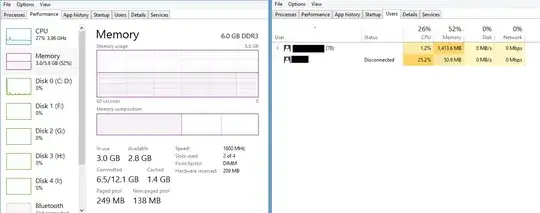
task manager

Which makes me wondering, why exactly is my memory used double of what it's suppose to be.

I know it's not memory leakage (non-paged is only 138mb), so is it just windows 8 itself ?

Devid
  • 6,299
  • 13
  • 55
  • 74
Gray_Hound
  • 13
  • 3
  • What makes you think the current amount of memory usage is strange? You didn't provide a view of which processes are running. You have 1.5GB cached and a combination of user and system processes are using the other 1.4GB ( in other words the reported usage matches exactly to what is actually used ). – Ramhound Jul 08 '13 at 15:41
  • based on : http://superuser.com/questions/497298/windows-8-task-manager-ram-usage-accuracy i can make an assumption that cached isn't used for "in use". Plus : http://i.imgur.com/3Vybutg.png from another discussion. – Gray_Hound Jul 08 '13 at 16:54
  • Your response doesn't address my question. What makes you think the usage is high? – Ramhound Jul 08 '13 at 19:05
  • The fact that there was 1.5GB unaccountable. (Unaccountable because cached isn't counted in the total 3.0 gb in use) – Gray_Hound Jul 08 '13 at 19:22
  • Are you certain that your "interpreter" is 64-bit? If it is crashing due to out of memory and you have plenty left then it could well be a 32-bit app running on 64-bit Windows. You can check on the "details" tab in task manager by right-clicking the colum titles, selecting "choose columns" and enabling "platform". This will give you a new column showing 64 or 32 bit-ness. A 32 bit interpreter will likely crash somewhere around 1.5-2GB if it does not support any kind of large memory situation. – Mokubai Jul 08 '13 at 19:29
  • It is, just seems it's eating up too much. (64 bit windows and 64 bit interpreter) – Gray_Hound Jul 08 '13 at 19:37

2 Answers2

2
  • Memory-mapped files are not included under an individual process, but will be included in the global memory usage
  • Driver memory is also allocated under global memory and not any individual process.
  • There are many system-level processes (services and other critical things) which are also not allocated to a particular physical user, and will not show up under the users list totals, and these further contribute to the global memory usage being higher than the user memory usage.
Darth Android
  • 37,872
  • 5
  • 94
  • 112
  • 1
    Is it possible to track what exactly is eating up the extra memory and possibly clear it out ? Restart ? – Gray_Hound Jul 08 '13 at 14:55
  • In all of those cases, you do not want to clear it out. You have 6GB of RAM available to your system, and unless you have a specific application that is crashing due to out of memory errors, you should simply not worry about it. Currently, you have 1.6GB of memory that is being completely wasted *because it's not in use*. Windows will eventually use it for cache though. – Darth Android Jul 08 '13 at 14:59
  • Problem is i am trying to run a RAM heavy application that is constantly crashing due to lack of memory. – Gray_Hound Jul 08 '13 at 15:24
  • Well, Windows will automatically clear out much of that memory (dumping caches or paging applications out to disk) when another application needs it. Have you modified your page file settings at all? Windows should be able to allocate an application on your system at least 9-12GB of memory before it would refuse, and will probably expand the page file to allocate more if you haven't changed any settings related to that. What application are you trying to run? – Darth Android Jul 08 '13 at 15:59
  • Haven't modified pagefile, and it's my code interpreter which (due to nature of the language) has to store data in ram. – Gray_Hound Jul 08 '13 at 16:44
  • I would still suspect the code interpreter is doing something wrong (memory leak, trying to pre-check available memory instead of relying on windows rejecting allocations) before suspecting memory issues. How much data are you processing with the interpreter? Based on that screenshot, you have more than enough memory to do heavy video editing or heavy photoshop work. – Darth Android Jul 08 '13 at 17:07
  • Working on a fairly large data sets (not sure exact size) which are stored entirely in RAM, but might be interpreter. – Gray_Hound Jul 08 '13 at 17:08
  • 1
    Based on that screenshot, you would still likely have issues with 16GB of memory in your system. You might need to re-evaluate your system requirements for processing this data, or if that sounds absurd for the amount of data that you're processing, then find a different toolchain to process it which doesn't consume so much memory. – Darth Android Jul 08 '13 at 17:12
1

Use RAMMap to see how the RAM is used:

enter image description here

Read the discription here what the values mean.

http://blogs.technet.com/b/askperf/archive/2010/08/13/introduction-to-the-new-sysinternals-tool-rammap.aspx

magicandre1981
  • 97,301
  • 30
  • 179
  • 245
