17

As a Linux user, I am very used to jump from word to word in vim/nano using ALT+left or right.

This doesn't seem to work properly using iTerm, I am using zsh, I tried adding;

bindkey -e
bindkey '^[[1;9C' forward-word
bindkey '^[[1;9D' backward-word

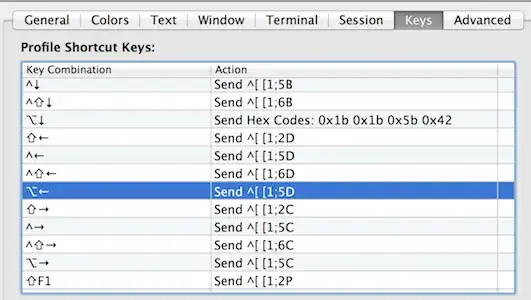
It does work, but inside zsh only, then I commented those lines and added in iTerm a keyboard shortcut;
enter image description here

It does work, but only for the ALTleft

How can I make it work for the right arrow too?

seds
  • 271
  • 1
  • 2
  • 4

5 Answers5

14

In iTerm's properties go to Profiles -> Keys and setup there

  • For ⌥→ Send Escape Sequence [1;5C
  • For ⌥← Send Escape Sequence [1;5D

enter image description here

eiennohito
  • 607
  • 7
  • 12
  • That doesn't work for me. The escape sequences are sent, but vim only moves one space back and forth. Running the default vim 7.3 that comes with OS X 10.8. Ideally, I'd like to change it on vim's side, not tweaking the defaults of the Terminal emulator (since that'll result in better portability). – slhck Sep 06 '13 at 07:01
  • That's weird, it works both in vim (from homebrew, not a default one) and zsh with the default configuration from oh-my-zsh (in ~/.oh-my-zsh/lib/key-bindings.sh). – eiennohito Sep 06 '13 at 07:04
  • Doesn't work here either, I can use alt + arrow in inside zsh, in Vim it only works with shift + arrow :( – seds Sep 07 '13 at 17:34
  • I checked it one more time on available remote systems (ubuntu 13.04, stable debian, and scientific linux) and it works everywhere. What is the output when you press Control+V, ⌥→? For me it is ^[[1;5C – eiennohito Sep 08 '13 at 09:03
  • Works for me: iTerm/Vi + zsh – Petro Semeniuk Jan 31 '14 at 02:20
8

Start by viewing the key code your terminal is sending to vim:

$ sed -n l
^[[1;9D 

In the above example, i ran the sed command and pressed Alt + Left.

The ^[[1;9D is the escaped sequence being sent to vim, so we can user that for our mapping.

Add to vimrc:

map <Esc>[1;9D :tabn<CR>

alternative solution for macOS

if sed -nl is not working as expected, try CTRL + V instead

You can determine the current mapping using the "control-V trick": First press control-V, then the keystroke you like to examine. This will print the characters that are sent to the terminal. http://www.macfreek.nl/memory/Backspace_and_Delete_key_reversed

For example typing control-V + delete prints ^?. I have only verified this on macOS 11.

1

I read another post describing that for option-left and option right, you need to bind them to the actions ^[b and ^[f, respectively. That is, you bind them to "Send escape sequence" and bind key b and f.

http://elweb.co/making-iterm-2-work-with-normal-mac-osx-keyboard-shortcuts/

Jay
  • 183
  • 1
  • 4
  • 1
    +1! I found similar instructions here: https://coderwall.com/p/h6yfda/use-and-to-jump-forwards-backwards-words-in-iterm-2-on-os-x – Cam Jackson Dec 14 '15 at 00:29
0

None of those answers worked for me. I ended up loading a linux VM and checked what I'd get with <Alt-ARROW>.

The 4 escape sequences which worked for me are those:

  • <Alt+Up>: [1;3A
  • <Alt+Down>: [1;3B
  • <Alt+Right>: [1;3C
  • <Alt+Left>: [1;3D

Be careful to edit the Profile keys and not the main ones which will be overridden by the Profile ones (where Alt + Arrows are set by default to an Hex Sequence which didn't work with vim).

Jerska
  • 101
  • 1
-1

Just an other possible solution, vim offers word motions on its own, see:

:help word-motions
tnull
  • 101
  • 1