4

I recently installed Windows 8, and yesterday I tried playing some games on it. The games were running smooth, but every time my mouse cursor ( in-game ) was anywhere near the top left or bottom left corner, and if I then clicked the mouse, then it's the same as clicking the windows-button. The Windows 8 overlay, or whatever it is, takes control of my monitor, and if I'm running Skype in the background, it gets temporarily muted. I can see now, when at desktop, that when moving the mouse to any corner causes some "HUD" to show up, buttons to click. I would like to disable this, as I just as easily can access this by using WIN, WIN+C and ALT+TAB. I don't know what the overlay-thing is called, so I didn't find anything when searching for it, just a bunch of touchpad-answer. This is simply when moving the cursor to any corner.

Edit:

This has happened to me in ArmA2, DayZ and here in League of Legends: Cursor changes at the edge of the screen When the cursor hit the very top left or bottom left corner of my screen, then the cursor changes to the standard windows-cursor, and stays like that along the entire left side of the screen, which corresponds to how it acts if you try this at desktop.
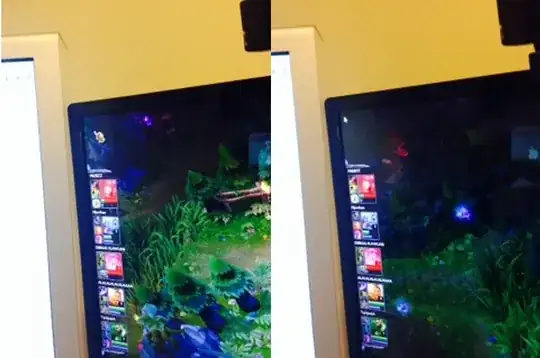
The answer to how I can disable this has already been provided, I am now simply showing what's happening to me, as people are saying it shouldn't happen. If I left- or right-click when the cursor is the white arrow as on the right image above, then the fullscreen windows-app-thingy appears, and covers the entire screen on top of the game. Either the bottom or top click made the sound disappear as well(at least for skype, as far as I remember), can't remember which.

I am currently using dual monitors, and I'm thinking that can have something to do with it. The second monitor is to the left of my primary, as you can see on the image, which leads me to believe there's something going on there. The çursor is changing on the edge to the other monitor, but the fullscreen game/application won't allow the cursor to enter the second monitor. Could this be a general bug affecting all dual monitor-users?

Rheven
  • 143
  • 1
  • 7
  • You cannot disable the Charms without third-party software. – Ramhound Sep 05 '13 at 15:12
  • @Ramhound Then how are we supposed to play games, when these 'charms' shortcuts apparently are overriding full screen applications? If I have to click a button in the very bottom left part of the screen on a game, that game is simply unplayable on Windows 8? – Rheven Sep 05 '13 at 15:14
  • 3
    @Ramhound, not true for windows 8.1: http://www.howtogeek.com/tips/disable-the-charms-hot-corner-without-a-registry-hack-on-windows-8.1/ – Joel Taylor Sep 05 '13 at 15:15
  • @JoelTaylor Thanks, turns out I don't have 8.1, so the option "Navigation" simply doesn't exist for me.. But you answered the question, so do you want to put that in an answer, so I can accept it? – Rheven Sep 05 '13 at 15:19
  • @Rheven - I play games on Windows 8 daily and I don't experience this problem. I cannot explain the behavior. I also use Skype and never had this problem. – Ramhound Sep 05 '13 at 15:19
  • @JoelTaylor - Windows 8.1 is not out yet. If it was I would have explain how to do that. – Ramhound Sep 05 '13 at 15:21
  • In Windows 8.0 it can be done by changing registry keys. I've added an answer – Joel Taylor Sep 05 '13 at 15:24
  • @Ramhound I'm a student, so somehow that gives me a free download over here, I'm installing 8.1 now. For the problem, it has to be a game that uses a cursor somewhere. For me, it happens when I'm playing ArmA2:OA or DayZ, when accessing my 'gear', I get a HUD and need to navigate with my mouse. If I click the bottom left part of my screen, everything becomes dark blue, all sound disappears(even skype) and suddenly there are apps everywhere. Meh. – Rheven Sep 05 '13 at 15:25
  • @Rheven - If you install Windows 8.1 you will have to reinstall all your desktop applications and Windows Store applications. There is no direct upgrade path from Windows 8.1 Preview to Windows 8.1 RTM. I play RTS games, every single one of them released before Windows 8 was released, I don't have this problem. They all have interface buttons on the bottom left and top right. – Ramhound Sep 05 '13 at 15:28
  • I should clarify my last statement. You will have to reinstall your applications if you upgrade to Windows 8.1 Preview today and then in Oct upgrade to Windows 8.1 RTM. – Ramhound Sep 05 '13 at 15:38
  • @Ramhound Oh thanks, good thing I never got the time to actually start the install earlier. If you take a look at the edited question now, you can see what I'm seeing, and some thoughts I'm having on the subject. – Rheven Sep 05 '13 at 19:13
  • I assume your using the current drivers? – Ramhound Sep 05 '13 at 19:30

2 Answers2

3

Windows 8.1 supports turning off hot corners in the Taskbar --> Properties --> Navigation menu.

If you don't have 8.1 you can turn it off in the registry by setting the following DWORD keys to 1 under KEY_CURRENT_USER\Software\Microsoft\Windows\CurrentVersion\ImmersiveShell

DisableTLcorner

DisableCharmsHint

Joel Taylor
  • 1,003
  • 9
  • 10
0

There is at least one other menu besides the TLcorner and CharmsHint. I have those disabled and this one remaining. It is accessed by right-clicking the bottom left corner. It might be important to note this is happening on a surface. Menu that overrides full screen game mode.

Johony
  • 1