3

I have created an autorun.inf to specify an icon and label for my removable drive. Unfortunately Avira detects it as a virus and won’t let it show the icon or label.

This is frustrating because I made the file myself, so I know it’s clean!

How can I prevent Avira (on any system running it) from blocking my autorun.inf?

Synetech
  • 68,243
  • 36
  • 223
  • 356
Mehdi98
  • 65
  • 2
  • 5
  • Probably Avira is just overreacting and the heuristic algorithm is flagging that file as malicious. Short answer, you can't protect from Avira. But other non-Avira PC's should be fine. – Doktoro Reichard Sep 21 '13 at 22:49
  • 2
    You could try `desktop.ini` instead; it provides most of that ability, but has some drawbacks like it is Windows-only, and even then, it may not work depending on the version of Windows and other configurations and policies. – Synetech Sep 22 '13 at 13:19
  • Another option is to set the icon and label in the registry in the key `HKLM\SOFTWARE\Microsoft\Windows\CurrentVersion\Explorer\DriveIcons`. These will even work for removable media that is not actually present like an empty DVD drive. Of course, like `desktop.ini`, it is Windows-only and has to be set on each system which means it is not portable. – Synetech Nov 04 '13 at 19:25
  • please mark an answer. – Back2Basics Nov 14 '13 at 06:06

1 Answers1

7

I want to create an autorun.inf to open automatically and set icon and label.
but my Antivirus,"Avira" detect it as Autorun virus!
but I made it myself!

That was a new feature in Avira 10 to protect people from Autorun/AutoPlay infections which have been on the rise with the increasing popularity of flash-drives. There’s been a lot of discussion of it in the Avira forums. [1][2][3][4][5][6]

On your own system, you can turn that function off:
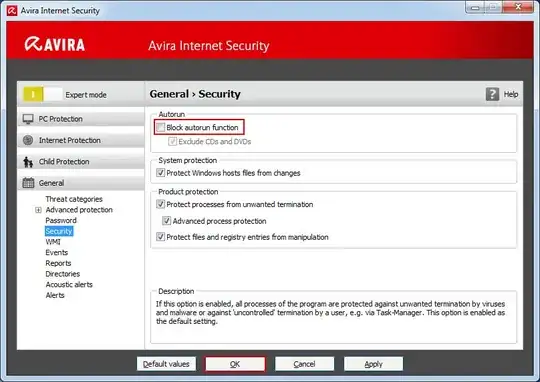
Screenshot of Avira’s autorun-blocking function

i want to work on all PCs and do not need to Avira setting and trust file
i do not know which computer has Avira and i can't do it for all computers! i want sth automatically do it! or protect it!

I’m afraid there’s really nothing you can do about that. If the file contained an actual threat, then you could simply remove or change that part, but if Avira is simply being cautions and warning about all autorun.inf files no matter what they contain (which it seems to be), then there’s no way for you to make it pass through on other systems running Avira; they would have to manually exclude it.

Synetech
  • 68,243
  • 36
  • 223
  • 356
  • no, i mean i do not know which computer has Avira and i can't do it for all computers! i want sth automatically do it! or protect it! Synetech , it is in the root of drive. – Mehdi98 Sep 21 '13 at 23:34
  • Synetech , it is in the root of drive. – Mehdi98 Sep 21 '13 at 23:36
  • Automatically do it. Which will be detected rightly as a virus attack since that's what autorun enabled viruses do. Step back and think up a new way of doing it. – Fiasco Labs Sep 22 '13 at 18:07
  • @FiascoLabs, you are misunderstanding what they are doing. They are not running a program to set the icon and label (which wouldn’t work anyway), they are using the `icon` and `label` fields of the autorun format, e.g.: `[autorun] ↵ icon=icon.ico ↵ label=My Flash Drive` – Synetech Sep 22 '13 at 18:18