4

In one of my Google Chrome profiles, opening a new tab displays the text about:blank in it. This has become increasingly annoying because my muscle memory is such that I start typing the URL foo.com immediately after opening a new tab, and with this pre-filled text, it ends up being about:blankfoo.com.
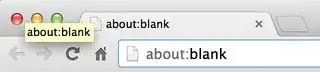
screenshot of a new tab

From a quick comparison of the preferences between this profile and another one (where this doesn't happen), I couldn't find anything that was obviously off, but perhaps I am not looking in the right place.

Is there a way to remove this pre-filled text from a new tab?

Jawa
  • 3,619
  • 13
  • 31
  • 36
  • @techie007 he doesn't want to make the new tab totally blank, he wants that the NTP doesn't display the `about:blank` page. – Braiam Oct 26 '13 at 20:10
  • @Braiam From the linked question: "Is there a way to either clear about:blank entirely or select all the text, so I can start typing straight away and not have to CMD/CTRL + A and backspace/delete?" the title on it is just crappy. ;) – Ƭᴇcʜιᴇ007 Oct 26 '13 at 20:12

1 Answers1

3

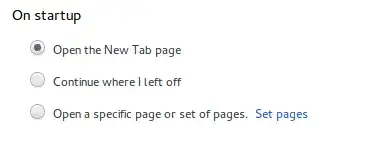
Type chrome://settings/ in the address bar, "On startup" section is very likely you have "Open a specific page or set of pages. Change it to "Open the New Tab page".

enter image description here

If you want to do thing manually, you can modify the Preferences file in the Default directory of Chrome/ium and look for this entry:

"new_tab_url": "{google:baseURL}_/chrome/newtab?{google:RLZ}{google:instantExtendedEnabledParameter}{google:ntpIsThemedParameter}ie={inputEncoding}",

yours most likely say:

"new_tab_url": "about:blank",

Just replace it with something you like.

Braiam
  • 4,709
  • 3
  • 26
  • 57