1

So I was about to re-partition my 500GB external HDD to be a bootable drive for Ubuntu 12.10. But when I started up GParted it showed that the only partition has used ~100GB.

GParted shows that I have used about 100GB on /dev/sdb1 (NTFS)

But in reality, I know that I have only used ~30GB, and both the Disk Usage Analyzer and the Properties page for the mount point confirm this.
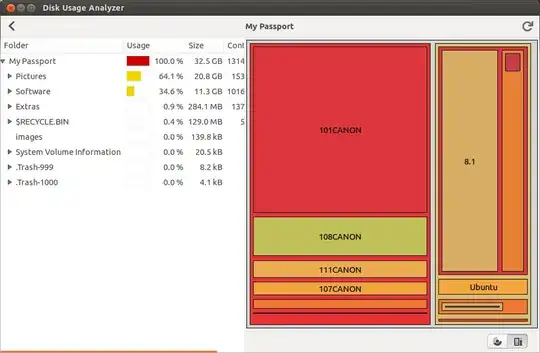
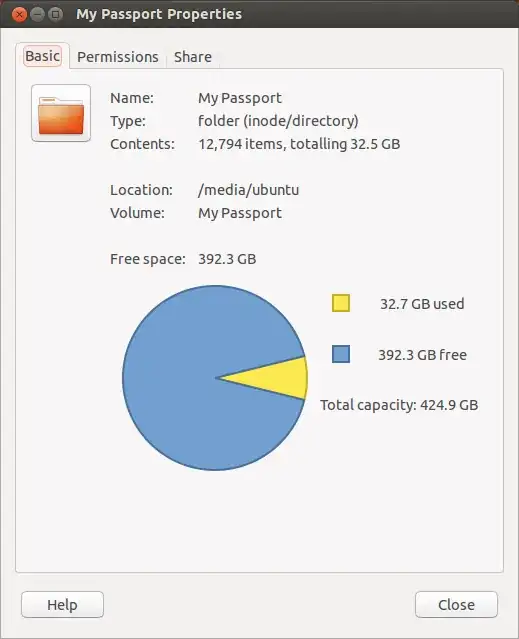
Disk Usage Analyzer shows that I have only used ~30 GB Properties page for <code>/media/ubuntu/My Passport</code> confirms this

Why would GParted show that I have used so much more space than I actually have? Is it just space that deleted files may be taking up, or is there something I should be alarmed about?

Thank you in advance.


Mogget
  • 1,314
  • 14
  • 25
KevinOrr
  • 115
  • 6
  • It's not only the used space that doesn't match, the disk capacity is also different. 465 Gb against 425 Gb. (That's already 40 Gb of your 68 Gb difference) Maybe your partition table is screwed up. It is a NTFS disk so you could try to see what's going on in disk-management on a Windows machine. – Rik Oct 28 '13 at 22:22
  • @Rik It gets worse. Windows reports that the disk has a capacity of 465 GB, but the partition only has a capacity of 395 GB. [Here's a picture showing this](http://i.imgur.com/SdwjaHl.png) – KevinOrr Nov 03 '13 at 00:16
  • @Rik As far as I can tell, [nothing bad was reported](http://pastebin.com/9z9j539F) by `chkdsk`. – KevinOrr Nov 03 '13 at 04:09
  • 1
    I still think the partition table is messed up. The best thing to do is to save the 33Gb to you C: drive (but of course you already have a backup :) and run [TestDisk](http://www.cgsecurity.org/wiki/TestDisk). This program can fix the partition table and lots more. See [here](http://superuser.com/questions/251374/my-western-digital-500gb-passport-disk-says-not-formatted-when-i-plug-it-in-wi#251395). – Rik Nov 04 '13 at 10:08

0 Answers0