4

In versions earlier than 7, Notepad interprets CRLF as a newline. While on Mac/Unix newline is just LF. Have they(MS) added this essential feature in the new Notepad??

PS: Don't have a Win 7 machine around, otherwise would have checked out myself.

detj
  • 981
  • 4
  • 14
  • 23
  • 1
    No, but [Windows 10 Notepad can do that](https://superuser.com/a/1359407/241386). [Introducing extended line endings support for Notepad](https://blogs.windows.com/windowsexperience/2018/05/09/announcing-windows-10-insider-preview-build-17666/#bXT2wthSrAbe8DtS.97) – phuclv Mar 06 '19 at 14:30

3 Answers3

7

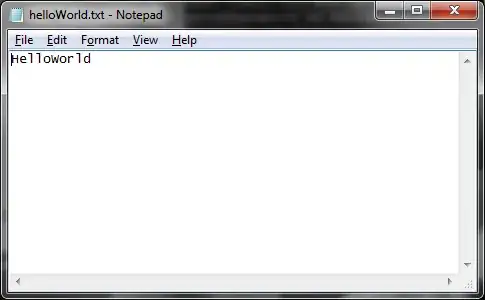
Just tried it, and no, Notepad still needs a CR character to insert a new line(Windows 7, build 7600 x64). The following ASCII file (0x0A == LF)

48 65 6c 6c 6f 0a 57 6f  72 6c 64 0a 0a           |Hello.World..|

renders as:

alt text

Gaff
  • 18,569
  • 15
  • 57
  • 68
heavyd
  • 62,847
  • 18
  • 155
  • 177
  • 2
    why Microsoft...why??? boohoooohooo... – detj Nov 06 '09 at 22:08
  • 5
    Cause they would be sued for having included a too powerful text editor in Windows (after IE and Media Player) ;-) – Snark Nov 06 '09 at 22:38
  • From https://devblogs.microsoft.com/commandline/extended-eol-in-notepad/ "New files created within Notepad will use Windows line ending (CRLF) by default, but it will now be possible to view, edit, and print existing files, correctly maintaining the file’s current line ending format." – Jason S Jun 19 '20 at 07:14
3

Wordpad always supported this feature, and Wordpad in windows 7 is much enhanced in other ways. It's almost a 'Microsoft Word Lite' now.

davr
  • 5,368
  • 7
  • 37
  • 46
  • though worth noting that if you open a word with unix line endings(LF), while it shows it, if you click save, it will save it with windows line endings(CRLF), which may or may not be what you want but is worth knowing about. – barlop May 02 '18 at 16:01
0

Since Windows 10 1903 it does support unix line endings. This is the announcement blog port.