1

I've just listened to Steve Gibson talk about his SpinRite software, on the Security Now podcast episode 336 (transscript).

At 33:20 he says:

I can show and do show on the SMART page that sectors are being relocated and that errors are being corrected. That SMART analysis page sometimes scares people because it shows, wait a minute, this thing says we're correcting so many errors per megabyte.

What is this SMART page?

1) Some information saved on the HD by SMART, that I can access with a SMART tool like smartmontools?

2) A page (tab) in his SpinRite software?

In any case, can I see, in any way, what sectors are marked as bad, without using SpinRite? Preferably using smartmontools!

Mads Skjern
  • 1,479
  • 8
  • 24
  • 40
  • Have you used Spinrite before? Its a tab within is application. The tool you want to use does not have the capability your looking for. Most S.M.A.R.T tools just read the S.M.A.R.T data they do nothing else. I find it very unlikely the tab in question actually displays S.M.A.R.T data, instead its very likely, its custom data Steve Gibson decided was important. If you continue to listen to that epsidode he explains he had to replace the information that was there with something. – Ramhound Nov 08 '13 at 12:15
  • Yes, you can use `badblocks` or `dd` to find which sectors are bad. – week Nov 08 '13 at 14:07
  • @Ramhound: Thanks, no haven't used it yet. I've listened the episode to the end, and I have done text search for "spinrite" on the transcript, but I can't find anything about "he had to replace the information ...", can you explain? – Mads Skjern Nov 08 '13 at 14:13
  • Why am I being downvoted? Not bithing, not feeling hurt, just really wondering, because I don't get it :/ – Mads Skjern Nov 08 '13 at 14:14
  • 1
    This is part of my answer, but its worth linking on its own so it can be found, since I chose to deal with the 'reality' of smart data, rather than Gibson's own theories - you can find the documentation on spinrite's smart page [here](https://www.grc.com/sr/smart.htm) and on the next page. – Journeyman Geek Nov 08 '13 at 14:24
  • 1
    I'm not actually sure either. Anyone familiar with spinrite would know some of the theories behind it are.. unusual, and may not be interpretable the way the average techie does. On one hand, I've heard decent things about spinrite historically. On the other hand, the theories behind it don't quite fit my view of technology. I think this is a pretty natural question to ask. – Journeyman Geek Nov 08 '13 at 14:30
  • I really should have looked at the Spinrite page to verify the tab in question, if I did would have shared what Journeyman did. As to regard what I was talking about where he had to replace information that was display in an earlier version of Spinrite, actually came from the most recent episode, I read episde "336" and decoded it as episode "4xx" in my mind. – Ramhound Nov 08 '13 at 16:19

2 Answers2

2

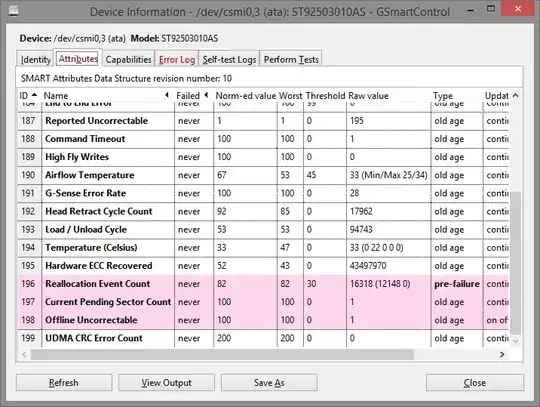
SMART is a protocol for 'talking' to a drive and asking it all sorts of questions. smartmontools is probably the right tool here, and gsmartcontrol is a nice graphical frontend for it. You can likely get all this information from smartmontools - view output shows the raw output, but the highlighting here shows the interesting stuff much more easily

This is a drive with bad sectors, on gsmartcontrol and you can see it has a reallocated sector count of 1.As you will see, smartmontools will give you this information if you run a self test.

enter image description here

and lots of other errors further down

enter image description here

and has very helpfully highlighted these in pink

It also has an error log which shows where this error is

enter image description here

after failing a test, as will the self test logs

enter link description here

Another approach would be to use badblocks or chkdsk with the right arguments to check the disk

As for the smart page itself...

I'm not a big fan of spinrite cause it often sounds like a whole load of science-fiction babble. Gibson claims to check the changes in smart status while the drive is working in order to work out if the drive is dying, and shows that information on a 'page' on spinrite - he goes in further detail, but I'm not convinced its worth repeating, since I don't understand most of it. However, the information is there, if you want to know, in Gibson's own words

Journeyman Geek
  • 127,463
  • 52
  • 260
  • 430
  • 1
    I have actually had sucess in resolving a problem with a hdd with at least 2 dozen reallocated sectors after running Spinrite, the drive would BSOD the system shortly after boot, I was able to get it into a state where I was able to image the entire drive ( although I did have to ignore some errors connected to bad sectors ) but that was because I did a sector by sector copy. In other words while you are right to question the marketing lingo, some of it might actually have merit, and I am not alone in having an experience like this. – Ramhound Nov 08 '13 at 16:20
  • 1
    @Ramhound Spinrite is basically snake oil, and the infomercial of a website that Gibson put up to extol its virtues only serves to reinforce that comparison. As for whether his solution has merit is debatable because he doesn't cite a single piece of scientific literature to back up his claims. I'd argue that any tool which triggers bad sector remapping would be at least as effective as Spinrite. Several years ago I tried it on a hard drive at work and it was still running a month later. I suspect his flawed constant retry logic caused further degradation of the drive. Next time try ddrescue. – rob Nov 09 '13 at 00:52
  • @rob your welcome to your view of SpinRite but I am not alone one having success with the tool and personally I have had little success with ddrescue. – Ramhound Nov 09 '13 at 03:00
  • The best thing about GSmartControl is the tooltips. Hold the mouse over any column header or any row, and it gives you very useful info for interpreting the numbers. – Mads Skjern Nov 09 '13 at 08:27
  • I'm a bit sceptical too, but mostly because his promotion reminds me of alternative medicine/TV-shop. My CD-player was crappy. With one specific CD, it just couldnt read the CD, when I put it in, no matter how much I tried. Somehow I found out that if I asked it to play track #10, before the CD was even loaded, it could somehow was able to load the CD, and after that I could choose any track. Steve talks of "attacking the pimple from different angles and different velocities", well, maybe that could be similar to what my happened with my CD-player :) – Mads Skjern Nov 09 '13 at 08:29
1

What is this SMART page?

He really was sparse there. What he meant was the SMART report of the hard disk.

Some information saved on the HD by SMART, that I can access with a SMART tool like smartmontools?

SMART do not save anything in your drive, but more like S. M. A. R. T. (Self-Monitoring, Analysis and Reporting Technology) is a set of test that your drive do regularly to prevent failures and improve performance. You can access this data with smartmontools as you have said, since this information is independent to your OS. It shows all sorts of data about relocated sectors (as he mentions), spins ups/downs times of the drives, etc, etc.

A page (tab) in his SpinRite software?

Yes. This was what he was referring to. SMART page, SMART report, SMART visualized, SMART whatever. When you talk about S.M.A.R.T. you are talking about the Self-Monitoring, Analysis and Reporting Technology included in all (modern) HD's. When you add another substantive is most likely to refer to a tool that reads/manipulate this data.

In any case, can I see, in any way, what sectors are marked as bad, without using SpinRite?

Yes. You can. The format the data is presented depends of the tool. Also, some vendors add their own CODES, so, sometimes you need their tools to read their codes. But! You don't need their tools specifically to read the SMART data of your Hard Drive.

Some insights about SpinRite

SpinRite seems to interpret the RAW data differently to your "Average Tool", taking in consideration other sets of parameters which they consider important, relevant, informative or preventive. Their tool just postprocessing the data is already there and shows it into an easy to understand way. You may have an idea of what could go wrong if you read the RAW data, SpinRite process the data and tells you exactly what (they consider) is bad.

Braiam
  • 4,709
  • 3
  • 26
  • 57