How about Graphviz? It actually allows you to create a graph in text, and it handles the visualization for you:
This is a graph of the UNIX family tree
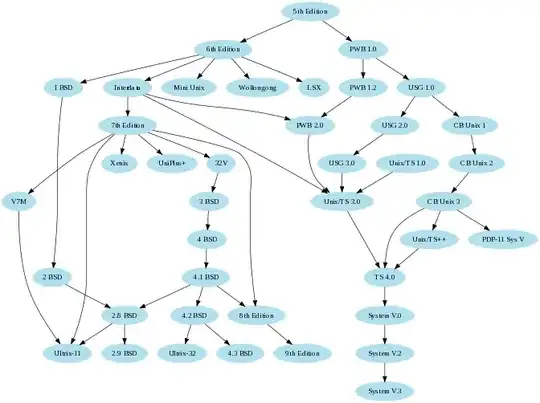
Here is the code that generates it:
/* courtesy Ian Darwin and Geoff Collyer, Softquad Inc. */
digraph unix {
    size="6,6";
    node [color=lightblue2, style=filled];
    "5th Edition" -> "6th Edition";
    "5th Edition" -> "PWB 1.0";
    "6th Edition" -> "LSX";
    "6th Edition" -> "1 BSD";
    "6th Edition" -> "Mini Unix";
    "6th Edition" -> "Wollongong";
    "6th Edition" -> "Interdata";
    "Interdata" -> "Unix/TS 3.0";
    "Interdata" -> "PWB 2.0";
    "Interdata" -> "7th Edition";
    "7th Edition" -> "8th Edition";
    "7th Edition" -> "32V";
    "7th Edition" -> "V7M";
    "7th Edition" -> "Ultrix-11";
    "7th Edition" -> "Xenix";
    "7th Edition" -> "UniPlus+";
    "V7M" -> "Ultrix-11";
    "8th Edition" -> "9th Edition";
    "1 BSD" -> "2 BSD";
    "2 BSD" -> "2.8 BSD";
    "2.8 BSD" -> "Ultrix-11";
    "2.8 BSD" -> "2.9 BSD";
    "32V" -> "3 BSD";
    "3 BSD" -> "4 BSD";
    "4 BSD" -> "4.1 BSD";
    "4.1 BSD" -> "4.2 BSD";
    "4.1 BSD" -> "2.8 BSD";
    "4.1 BSD" -> "8th Edition";
    "4.2 BSD" -> "4.3 BSD";
    "4.2 BSD" -> "Ultrix-32";
    "PWB 1.0" -> "PWB 1.2";
    "PWB 1.0" -> "USG 1.0";
    "PWB 1.2" -> "PWB 2.0";
    "USG 1.0" -> "CB Unix 1";
    "USG 1.0" -> "USG 2.0";
    "CB Unix 1" -> "CB Unix 2";
    "CB Unix 2" -> "CB Unix 3";
    "CB Unix 3" -> "Unix/TS++";
    "CB Unix 3" -> "PDP-11 Sys V";
    "USG 2.0" -> "USG 3.0";
    "USG 3.0" -> "Unix/TS 3.0";
    "PWB 2.0" -> "Unix/TS 3.0";
    "Unix/TS 1.0" -> "Unix/TS 3.0";
    "Unix/TS 3.0" -> "TS 4.0";
    "Unix/TS++" -> "TS 4.0";
    "CB Unix 3" -> "TS 4.0";
    "TS 4.0" -> "System V.0";
    "System V.0" -> "System V.2";
    "System V.2" -> "System V.3";
}
As you can see, the syntax is easy to add on to, you could easily use it as a skeleton for your own:
digraph workingcomputer {
    size="6,6";
    node [color=lightblue2, style=filled];
    "Computer" -> "Hardware";
    "Hardware" -> "Hard Drive";
    "Hardware" -> "CPU";
    "Hardware" -> "Memory";
    "Hardware" -> "Motherboard";
    "Hardware" -> "Power Supply";
    "Hardware" -> "GPU";
/* And so on.... */
}


