1

I just got a new graphics card, AMD Radeon HD 7790, and I'm having trouble installing the driver. I uninstalled my all of my old graphics drivers and used Driver Sweeper. I then downloaded the appropriate driver from the AMD site and attempted to install it, but I ran into errors when the installer tried to install the Display and HDMI Audio driver packages. According to the log, both failed because the INF file was not found.

Next, I downloaded the auto-detect driver installer and tried to run that and ran into the same problem.

Here's the AMD install log: enter image description here
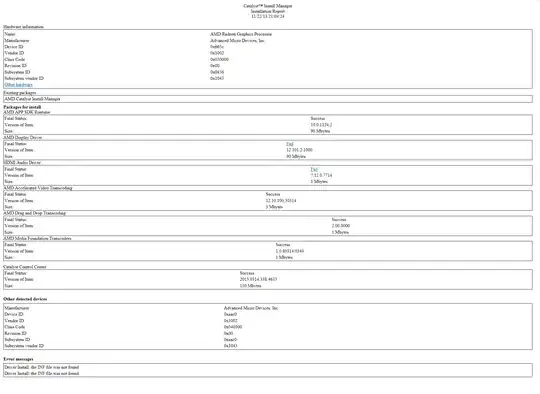
I've run an sfc /scannow and that came up clean. I then tried to manually install the driver through Device Manager, but that didn't work either (There is no driver selected for the device information set or element.).

Jason L
  • 111
  • 5
  • 1
    Do you have any odd configurations or re-directions or cross linking things going on with "temp" locations? (which ones I do not know). – Psycogeek Nov 23 '13 at 00:41
  • Not that I know of. – Jason L Nov 23 '13 at 00:53
  • ok, that is what i was asking. if you or some program had changed them. You could check if you wanted to. In run systempropertiesadvanced.exe then to the "enviroment variables" 2 on the top 2 on the bottom, just see if they are there and pointing right, and that those disks have some space. – Psycogeek Nov 23 '13 at 01:15
  • Ah, in that case, the user variables are normal. I do have more than two system variables, but they seem to be in order. – Jason L Nov 23 '13 at 01:29
  • Your install fails are specific to "driver" aspects of the install, not the "software". other than that the picture of the log isnt helpfull. Need the fail points, longer log or something (not that I could interpret it). Manual install of AMDs mess probably wont get you far enough, even if it was made easy. – Psycogeek Nov 24 '13 at 03:37
  • This is the only log they gave me. I'll search to see if I can find a more detailed log, but this is the one they point to. – Jason L Nov 24 '13 at 03:40

2 Answers2

0

Try a system Restore if possible.

Also you can try to install the non-latest updated driver for your new graphics card.

Scorpion99
  • 1,109
  • 2
  • 12
  • 32
0

A bit extreme, but after exhausting all other options and troubleshooting, I ended up reinstalling my OS. After doing so, the driver installed without a hitch.

Jason L
  • 111
  • 5