0

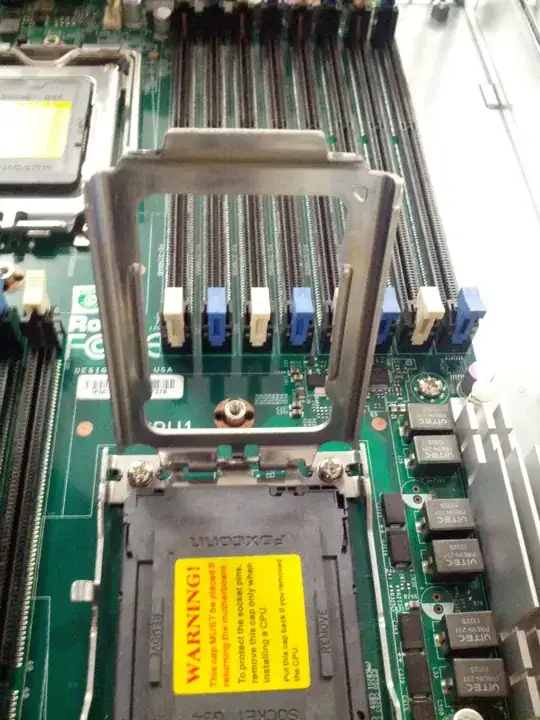
I have the following supermicro motherboard which I am having some issues installing a CPU into.

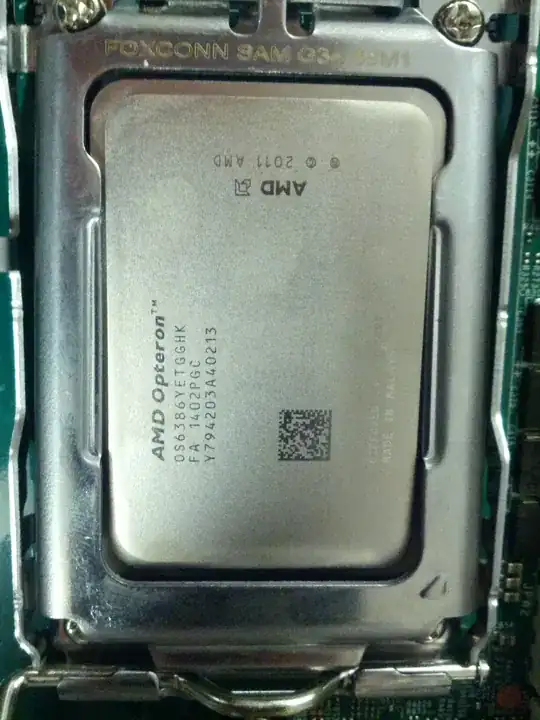
The CPU is as follows

Opteron 6386 SE Part Number OS6386YETGGHK 6300-series "Abu Dhabi" (32 nm)

The CPU fits nicely into the socket, however the silver CPU retention plate does not fit nicely over the chip and I am fairly sure if I close the sockets clamp I would damage the chip. The motherboard CPU install guide suggests that the retention clamp should just fit over the CPU.

From everything I have read so far the CPU should be supported in this motherboard. However I am fairly sure if I closed the clamp on the socket (see the last photo) I would damage both the motherboard and CPU.

Has anyone installed a CPU like this one in a similar setup, if so I have a few questions.

Q 1: How much force is required to have the CPU retention plate fit over the CPU?

Q 2: Is there only one G34 clamp assembly or does this depend on the chip.

Socket Socket Opened Close up of socket Chip in socket Clamp lever

Update: I contacted supermicro support and they very kindly sent me a video of a similar install, after watching the video I was brave enough to close the clamp. I guess it was a case of better safe than sorry this time round.

Hennes
  • 64,768
  • 7
  • 111
  • 168
Paul Whelan
  • 121
  • 1
  • 5
  • Make sure the orientation is correct. there should be some resistance but not a great deal. If you purchase `Socket A` motherboard and purchased a `Socket A` CPU it will work. `Socket A` is a placeholder value for the actual Socket type since I am to lazy to look it up for a simple comment. Your pictures show the CPU is installed and the latched is locked....Whats the problem exactly? – Ramhound Feb 27 '14 at 14:19
  • @Ramhound thanks for the input I know its a socket G34 chip and a socket G34 motherboard. But I've installed CPUs before and everything tells me if I close the lever to secure the chip in the socket that the retention clamp will damage the CPU. PS: The last picture the latch is not locked, I am afraid to do so as I feel it will damage the CPU. – Paul Whelan Feb 27 '14 at 14:47
  • Just to follow up the last picture the latch is at 90 degrees to the motherboard I realise now that may not be obvious from the picture. – Paul Whelan Feb 27 '14 at 14:49
  • Do you trust the source of the part? Fake CPUs do exist in this world. Its simple enough to put pins but the size would not be exact in the case of a fake item – Ramhound Feb 27 '14 at 14:53
  • @Ramhound I'm actually not sure of the source, I just got handed all the parts :) Interesting point though thank you. – Paul Whelan Feb 27 '14 at 15:20

1 Answers1

1

Judging by your pictures, all looks right.

Just strap it down, the landing pins are springy and you should expect to have to apply a bit of force to fight the springs and lock it down, that tension is intentional and required for contacts.

The protective plastic slug/cover that it comes with doesn't contact the landing pins, and therefore requires little to no force to lock into the socket.

Having said that, if you're afraid/worried, then pack it up and take it to a professional PC assembly/repair shop, pay them and let them install it, as they'll then be responsible for replacing parts if they screw it up. :)

Ƭᴇcʜιᴇ007
  • 111,883
  • 19
  • 201
  • 268
  • thanks for the answer, I closed down the clamp and it didn't break anything. With the cost of the chip and motherboard combo I think I lost my nerve :) – Paul Whelan Feb 28 '14 at 10:42