2

I have a dual boot under W7 x86 and W7 x64. Both are freezing randomly. sometimes the HDD led is fully on. Waiting only brings sometimes a black screen. here is when It freezes

  • Playing a game, mostly AC
  • Running chrome sometimes freeze while loading a page
  • Seems it is rarer in 32 bit
  • Sometimes, when I try to stop the screensaver, it is not responding (keyboard + mouse) which let me think that it froze while sleeping since I have to hard reboot since #3. Note that CD ROM reader is working.

Here is my config :

GPU: Nvidia GT 610
PSU: Antec EA-430 Green
CPU: AMD Athlon X2 64 5000+ @2.6GHz
RAM: 8 Gigs Kingston

Also, the ACPI is s1 &s3. Finally, it seems that freezes came by session : I get a freeze after a long time and then I reboot, then I can get several freezes quickly. It makes me think it's b/c of overheating but I ran a GPU stress test and it get past 100 °C w/o freezing. Besides, according the following charts, it doesn't get past 90 - 95° C.

Here is a chart of my log while playing until it freeze (open in a new tab to enlarge):
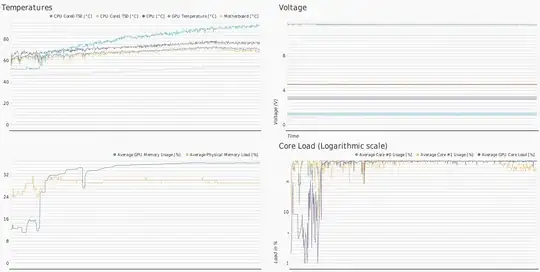
chart

A second one uring an other session of gaming:. I usually overclock my GPU from 810 MHz to 830 MHz but this time:
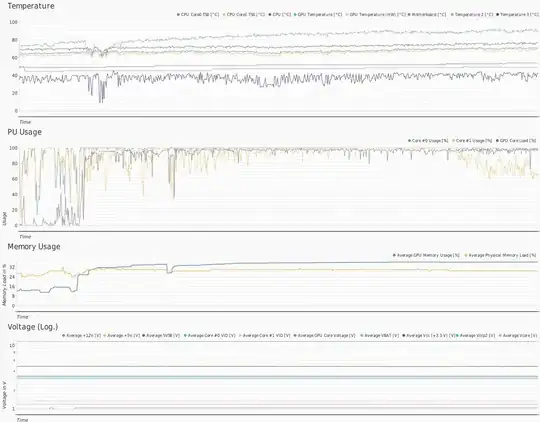
chart 2

I ran a GPU stress test and it is boiling (get past 100° C) without any freeze. Stop there to avoid burning out my GPU

UPDATE #3

I removed the latest version of the nForce drivers into a lower one, it seems freezes in game are rarer.( I got one after)

So,

  • What can I try to solve the freezes ?
  • Is it worth upgrading my config? please use arguments

UPDATE #4

It froze while poking around in the BIOS.

I must also precise that I don't have any inverter I had one but it was dead since some times - perhaps the freezes started just after. Anyway, I bought one just now. We'll see.

UPDATE #5

I manually tested my Power Supply, it displayed 12.36 for +12V, and didn't seemed to change anything. However it seems I applied too much thermal paste on my CPU (grey one).

UPDATE #6

I cleaned the cpu and the paste but i stil got freezes...

Vinz243
  • 83
  • 1
  • 21
  • You don't have the current Nvidia drivers. The current version is the 334.89 WHQL – Ramhound Mar 06 '14 at 18:06
  • I know but the first freezes came with it... now i am sure that it is not b/c of a buggy 133.89 – Vinz243 Mar 06 '14 at 18:28
  • Came with 133.89 either thats the actual driver version or its really old software. I don't have the dll version handy for the 334.89 release. Do a clean insallation with the current drivers – Ramhound Mar 06 '14 at 18:33
  • I made a mistake it's 334.89. But I will make an update soon. – Vinz243 Mar 06 '14 at 18:38
  • There isn't anything to update. 334.89 is the current release. The only thing you could do is try an earlier version. Post your dxdiag report. – Ramhound Mar 06 '14 at 19:25
  • Are there any web pages that consistently lead to freezes? – Slartibartfast Mar 22 '14 at 21:27
  • You could try [this fixit](https://support.microsoft.com/kb/2681286), although there is no info about what exactly it checks. – harrymc Mar 23 '14 at 08:58
  • 3
    And don't overclock. – harrymc Mar 23 '14 at 10:56
  • Have you ever tested your RAM with memtest86? – Oliver Salzburg Mar 23 '14 at 11:29
  • @OliverSalzburg not with memtest86 b/c It didn' ran. ut I've done it w/ windws utility o boot. – Vinz243 Mar 23 '14 at 14:12
  • @harrymc I get error `8004FE2C` – Vinz243 Mar 23 '14 at 18:09
  • Is there anything useful in the Event Viewer? – harrymc Mar 23 '14 at 19:08
  • I checked a long time ago i will take a look next freeze – Vinz243 Mar 23 '14 at 19:44
  • Your temperatures are very high. Its probably overheating problem, I had similar freezing too for that reason. Also i suspect your RAM is not compatible with motherboard etc. Or its just broken or with bad settings etc. Most probably just overheating overall. If i was in your situation, i would do fresh install and reset everything to "factory defaults". – Rookie Mar 26 '14 at 17:51
  • 1
    I think your problem could have something to do with a failing hard drive. Read the S.M.A.R.T. values off the HDD using something like [Speccy](http://www.piriform.com/speccy) and check if your HDD has problems – Vinayak Mar 27 '14 at 15:07
  • @Vinayak, could that be possible when it freezes on BIOS too? – Rookie Mar 27 '14 at 17:11
  • I'm not entirely sure. It could be possible. When my old PATA HDD failed, it took forever to get to the BIOS as it used to get stuck on HDD while enumerating devices. The BIOS resides on the motherboard, unaffected by HDD but it does enumerate them during POST. – Vinayak Mar 27 '14 at 17:45
  • [This](http://superuser.com/q/649294/16718700) was the problem I was facing with my computer. A new HDD fixed those problems. You might want to check your HDD's S.M.A.R.T. data using [CrystalDiskInfo](http://crystalmark.info/software/CrystalDiskInfo/index-e.html) instead of Speccy. – Vinayak Mar 28 '14 at 10:23

5 Answers5

3

It can be related to drivers problems (always keep your drivers up to date), freezes can also be caused by an overheating, monitor the temperature using SpeedFan for example to be sure that the GPU does not exceed the 95°C (mostly nVidia GPUs have a 105°C critical temperature). Last, if you tried to overclock your GPU/GPU Memory, set back the default frequencies, some GPUs just don't like overclock :) .

  • What about W7 updates ? – Vinz243 Mar 06 '14 at 10:26
  • It could be, but that's very rare, in the chart log that you've posted, the GPU core keeps heating without stabilizing (in normal cases, your GT610 would not get over the 85°C if it's well cooled). If your graphics card is a passive one (without fan cooler) try to place a fan so you can keep it cold. – Tarek Jellali Mar 06 '14 at 13:28
  • Yes, but as the chart shows, it doesn't get past 90°C. See my updated post for a new chart – Vinz243 Mar 06 '14 at 16:29
  • Yeah, I assume that your PC did not froze when you logged this, you can try to stress your GPU and see if it heats too much with [Kombustor](https://dl.dropboxusercontent.com/u/6015601/MSI_Kombustor_Setup_2.4.2.exe) and watch the temperature of the GPU. Did you update your drivers by the way? – Tarek Jellali Mar 06 '14 at 16:46
  • See my updated post – Vinz243 Mar 06 '14 at 17:43
  • Yeah it does heat a lot, try to place a fan if you have one. I got a 9800GT on my computer, it occasionally freezes after reaching ~70°C and become unstable pass the 85°C, it also hates overclock, if I try to push it more than 25Mhz the computer freezes. I can only advice you to avoid overclock and placing a fan that will improve the airflow in the computer, 100°C that's -5°C than the critical temperature handled by your GPU, 65 => 85° are acceptable. – Tarek Jellali Mar 06 '14 at 20:24
  • But I don't get any freeze with Kombustor. Is it worth changing the motherboard and the CPU? – Vinz243 Mar 06 '14 at 20:30
  • Not really, just keep the card cool and I hope you'll have no more freezes :) . – Tarek Jellali Mar 07 '14 at 08:03
  • perhaps it is just temporary, but I could play 2 hours w/o a freeze. I just uninstalled the lastest NForce drivers. – Vinz243 Mar 07 '14 at 11:36
  • unfortunately I froze after one hour. I was playing and it froze and I heard for 5 secs a sound as if it was reading a scuffed CD-ROM (AC I's DVD was in the player). Then no more sound. had to hard reboot. See also update #3 – Vinz243 Mar 19 '14 at 15:17
  • Machine freezes are typically due to CPU (not GPU) overheating. Place the machine where there is unobstructed air flow. See if there is lint in the box. – vonbrand Mar 23 '14 at 17:45
2

Man, I had a similar problem some time ago, and it was driving me crazy!
So, that's what solved my problem: change the Memories of slot.

I started to think what changes I did until this problem came annoy me, and then I realize that I had bought a new FAN for my FX-8350 and I've needed to change the memories of slot because of the size of the FAN, then I turned on the PC and performed a stress test of Memory, at some point the Windows Freezes, so that were the problem.
I changed the FAN and put the memories back on the original slots, then the problem disappeared!

Hope this help! :)

Edit: This could also be a motherboard slot problem or a memory problem.

  • This solved a workstation issue for me once. Strange solution but when you get an intermittent issue and are at a loss, sometimes these weird solutions get it done. :) – isildur Mar 29 '14 at 16:41
  • I chnage my mb THEN removed 2slots of RAM and it worked. Thank you – Vinz243 Apr 04 '14 at 19:45
1

Get a new CPU cooling unit Your computer CPU is overheating and shutting down to prevent CPU damage. Average temperature of the CPU is 40-45c.

I had the same problem with CPU overheating, going very high above 70c and Windows would freeze.

Common problems to check for overheating CPU:

  • It's usually the thermal paste not being put properly.
  • CPU fan not being strapped on tightly
  • The CPU has liquid cooling and all the solvent dried-up.
  • You dropped the computer while carrying it, the CPU fan went ajar or out of position.
  • The CPU heat sink has damaged foils or bent due to misapplied pressure when mounting.
  • The CPU heat sink is full of dust and CPU fan is turning around dust :)
buttercup
  • 186
  • 3
1

For the overheating issue, I would undoubtedly recommend you to invest in Arctic Silver 5 Thermal compound or a similar quality one. It would decrease the heating issues definitely.

Secondly, if you don't mind using your system without the cabinet would surely be a plus [Experimental way, perhaps very successful], it allows the heat to flow off more easily and if you don't like buying big cooling fans, use a table fan with the above config. Trust me it would work.

Thirdly, the internal software/driver issues are solely not the reason for freezes, or maybe not at all.

Also, while using chrome; disable the extensions which you are not currently using. (Tab-suspender extensions DO NOT SAVE the memory)

I would also recommend you to play games with every other big application to be closed on the sides. It is a good practice, and prioritize your assassinscreed.exe in task manager. (Although I haven't noticed much difference with prioritizing).

Hope you have a smoother gaming experience. :]

Sandman
  • 209
  • 1
  • 4
0

I know this sounds simple, but it saved my bacon on a Dell server that kept randomly freezing and rebooting after a power outage and UPS failure on a rack server. Called Dell support and the tech recommended this solution.

So he told me to pull all cables connected to power and powered peripherals from the unit, then press and hold the power button for 15 seconds. Reconnected everything and it worked flawlessly. His explanation was that some capacitors have the tendency to keep a "dirty charge" after a power outage or a system freeze. I don't know how this worked but I know it solved the problem.

Since, I have used this technique to solve many an issue with servers, workstations, fax machines, etc.

It's worth a shot.

As a side note, I pretty much spend two days doing the things you already mentioned before calling tech support with no luck. It happened to be a known issue for that particular server but he mentioned that he had also used the technique to solve many an issue on other devices.

Good luck.

isildur
  • 265
  • 2
  • 9