5

I'm deleting a Python installation folder (12000 files, 256 MB) from a USB flash drive, using Windows. It is currently expected to take 40 minutes. Why?

I thought it would be enough to change a couple of bits to "unlink" the root folder.

I think the filesystem is FAT.

Jarmund
  • 5,988
  • 5
  • 33
  • 57
Anna
  • 247
  • 1
  • 3
  • 5
  • Relevant: http://stackoverflow.com/questions/186737/whats-the-fastest-way-to-delete-a-large-folder-in-windows – Oliver Salzburg Mar 31 '14 at 09:58
  • How old is the usb flash drive? Give us the model name. I'll give you appropriate information concerning your problem. It could either be a old/low performance flash drive, low performance in deleting many files (even though they are small), or computer cpu slow. – PathToLife Mar 31 '14 at 10:08
  • @Pathfinder I think it is new. I got it from work packaged a month ago. I don't know the model name. In Explorer->Properties, it shows up as "Generic Flash Disk USB Device". – Anna Mar 31 '14 at 10:26
  • @OliverSalzburg Thanks, I think that solves my problem! – Anna Mar 31 '14 at 10:27
  • See David's answer. http://superuser.com/questions/730266/why-is-it-faster-to-copy-than-overwrite/730276?noredirect=1#comment937031_730276 – EliadTech Mar 31 '14 at 11:21
  • @EliadTech I don't understand. There's no need to actually erase all data by overwriting it with zeroes. – Anna Mar 31 '14 at 11:23
  • @Anna As David wrote (and as I understood), it's an internal function of the flash memory that need to mark each cell on the flash memory as empty. In regular spinning drives you're correct - the file system just marks the space as available. – EliadTech Mar 31 '14 at 11:40
  • this is all nonsense. if we delete at file system level we only edit FAT and directory entries, we're not deleting actual data. So flash overhead (FTL) only concerns sectors containing file allocation tables and directory structures involved. yes, this can be slow on a flash drive that's almost full, but it's not like the drive is erasing every sector allocated to files. Tip: get faster and above all *larger* good quality flash drive. – Joep van Steen Feb 15 '23 at 21:43

1 Answers1

-1

Why does it take so long time to permanently delete files from a USB drive?

"It's an internal function of the flash memory that need to mark each cell on the flash memory as empty. In regular spinning drives you're correct - the file system just marks the space as available."

Trick..

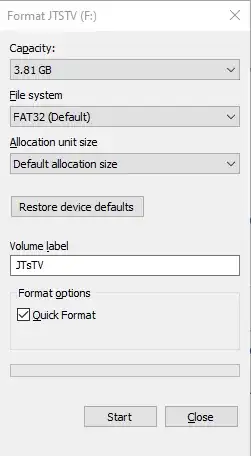
Deleting files from an 15 year old USB drive is soooooooooo slow. If you only need a few files and the rest I can be permanently deleted, simply copy the few files to another drive and Quick Format the USB Drive in an instant.

If you need to use an old USB 1.0 for your TV this will save you time.

enter image description here

enter image description here

Jeremy Thompson
  • 1,275
  • 1
  • 12
  • 24