2

To begin with, Auto arrange icons and Align icons to grid are turned off.

The machine has 3 monitors attached. I like to put my gadgets on one, icons on another, and leave the main desktop space pretty clear.

When we use Switch User, the icons rearrange themselves for no apparent reason. This sometimes occurs just after a reboot.

How can I tell windows to stop doing that?

NotMe
  • 406
  • 4
  • 17

1 Answers1

1

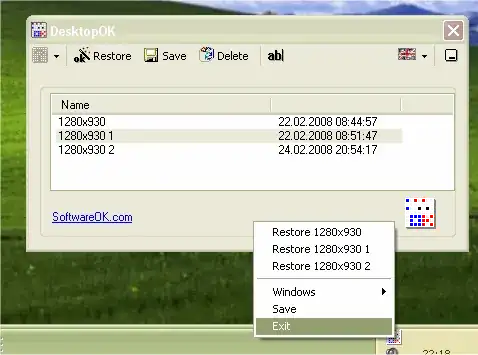
Get DesktopOK - it will save and restore the positions of icons.

alt text

DesktopOK is freeware, works for Windows Server 2000/2003/2005 and Windows 98/XP/Vista and Windows 7 32-bit/64-bit.

Alternatively, try this Vista 'registry hack':

Save and Restore Desktop Icon Layout in Windows Vista

Gaff
  • 18,569
  • 15
  • 57
  • 68
  • I was hoping for something that would either prevent windows from doing it in the first place or at least just silently restore them to the last position I put them in... – NotMe Dec 01 '09 at 14:43
  • Does DesktopOK only work on the desktop? Or will it work for other folders as well? – g . Dec 22 '09 at 20:14