9

Before I start, don't lecture me on the fact that FAT32 is old and hasn't been updated for nearly 20 years. Right now I have sorted that. I am trying to install Ubuntu Linux onto a 64GB flash drive and it wants me to format it to one of the EXT file systems.

The problem is if I put the flash drive into a Windows PC, I can't use it. I also can't install the required software onto every Windows PC that I will use. When I tried to install it on FAT32 I got an error and there is no option for NTFS.

Does anyone know how I could do this? Maybe a Windows based tool? Thanks in advance.

wjandrea
  • 595
  • 8
  • 19
09stephenb
  • 887
  • 6
  • 14
  • 31
  • 2
    I have installed Linux on FAT32 in the past, but, because of the large number of small files, storage is very inefficient and occupies twice or more times the space you'd expect. I have been using the open source **Ext2** driver in Windows to access my Ubuntu system on ext4. I use only read mode, but write mode is supported, though you would be advised to back up well before using, until you are confident. See http://www.ext2fsd.com/ – AFH Jul 14 '14 at 09:26
  • @AFH do you mind publishing a simple guide http://unix.stackexchange.com/questions/340829/how-do-i-run-basic-linux-on-file-permissionless-file-systemex-fat32 – William Jan 28 '17 at 18:31
  • @William - I'll look at doing so, but it's a long time since I did it, so I'll need to do quite a lot of work to validate the procedure, so it won't come soon. – AFH Jan 28 '17 at 19:12

3 Answers3

17

Linux relies on a number of filesystem features that simply are not supported by FAT or NTFS -- Unix-style ownership and permissions, symbolic links, etc. Thus, Linux can't be installed to either FAT or NTFS. (It used to be possible to do this using a FAT driver that adds those features, but it was removed from the kernel years ago because nobody was maintaining it.)

If you need a USB flash drive that both boots Linux and can be accessed from Windows, then I second Zonder's recommendation to create a FAT or NTFS data partition on the drive, along with the Linux partition(s). Note that you'll need to put the FAT or NTFS partition first on the disk, because Windows treats USB flash drives as "superfloppies," and will access only the first partition on the disk. Linux is not limited in this way, so you can put the Linux partition(s) after the shared-data partition. Also note that you can't use FAT or NTFS as the Linux /home partition; if you go this route, you'll need to mount the shared-data partition somewhere else in Linux.

Rod Smith
  • 21,455
  • 3
  • 43
  • 55
  • > Also note that you can't use FAT or NTFS as the Linux /home partition As I remember, I used monted /home to NTFS partion and hadn't any problems. But I'm not sure. Why you recommend to avoid this? – Sergey Ponomarev Dec 25 '15 at 20:56
  • "It used to be possible to do this using a FAT driver that adds those feature" Is I correctly understood you that previously Linux had some special FAT driver with emulation of Unix-like permissions and file links? If yes, where can I read about this? Thanks – Sergey Ponomarev Dec 25 '15 at 20:59
  • 1
    The Linux [umsdos](https://en.wikipedia.org/wiki/FAT_filesystem_and_Linux#umsdos) filesystem type was used to mount FAT filesystems with full Unix/Linux filesystem features (long filenames, permissions, ownership, etc.). Support for it was dropped a long time ago, though -- in the 3.0 or earlier kernel, IIRC. Neither FAT nor NTFS is suitable for use on `/home` because programs may require symbolic links, permissions, and other features there; and if your system has multiple users, these filesystems can't handle the file owner features required. – Rod Smith Jan 02 '16 at 15:09
  • 1
    @RodSmith NTFS has both shortcut(you could trick the OS into viewing them as a soft/hard link) and permissions usage what else is missing? – William Jan 28 '17 at 18:32
  • 2
    I just checked, and the read/write NTFS3g driver supports symbolic links, but not changing ownership or permissions. (Note that Windows uses very different ownership and permissions models from Linux, so although NTFS supports *Windows* ownership and permissions, this doesn't translate easily to Linux.) The last I heard, there were some proposed/experimental ways to add this support, but they aren't mainstream. Also, NTFS3g is a non-kernel driver, which makes it iffy at best for use on root (`/`). – Rod Smith Feb 01 '17 at 01:09
  • The [posixovl](https://sourceforge.net/projects/posixovl/) filesystem allows storing files on a FAT filesystem, with extra metadata stored in additional files to implement things that FAT doesn't provide: file names containing characters that FAT forbids or that are too long, additional metadata such as permissions and ownership, other file types such as symbolic links and devices, etc. But it is FUSE module and works in user space. The same can be rewritten as a kmod and adapted for NTFS. The NTFS already supports links and even case sensitivity of file names. – Sergey Ponomarev Apr 25 '20 at 20:48
  • 2
    @SergeyPonomarev Even without `posixovl`, NTFS supports everything Linux needs with its highly flexible "extended attributes" for files and directories (entries). – iBug Nov 24 '21 at 12:31
  • @SergeyPonomarev NTFS is fully POSIX compliant, because [it has to support the Microsoft POSIX subsystem](https://superuser.com/a/1426861/241386). Both were released in 1993. Nowadays WSL also utilizes the POSIX feature of NTFS for its filesystem. In Linux [ntfs-3g can also store POSIX permissions on NTFS](https://askubuntu.com/a/74851/253474) – phuclv Sep 03 '22 at 08:11
  • ok so basically now it's possible to install Linux of NTFS? If yes, that's a huge simplification for newcomers. I wish to have C:\linux and not bother with a separate partition formatting – Sergey Ponomarev Sep 03 '22 at 14:46
  • @SergeyPonomarev It makes installing Linux on NTFS *possible* but never *for newcomers*. Your best bet is still setting aside some space for a separate Linux partition. – iBug Sep 03 '22 at 15:16
4

How about creating 2 partitions one for linux os minimal size and then leave the rest as fat32. That way linux gets what it wants and you can stil use the remaining space.

I am not sure how mac os will behave with this but windows is supposed to ignore all partitions on a removable drive except the first windows readable one.

There is a program called bootice which can help you do this. But a quick internet search will find lots of articles on partitioning a usb drive.

Zonder
  • 976
  • 9
  • 19
2

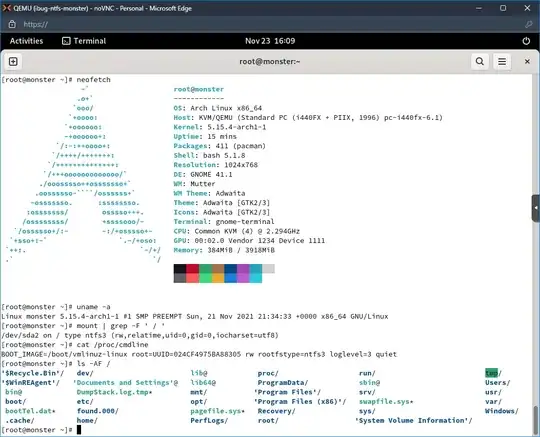
As of 5.15 Linux can be installed on NTFS (though it may break at any minute), and even alongside Windows.

Arch Linux

Do not try this unless you're familiar with both Linux and Windows.

iBug
  • 10,304
  • 7
  • 37
  • 70