I'm having a hardware failure when booting and I need to know the exact beep-code definitions for the Asus M5A97 LE R2.0. Could someone provide me the beep-codes of that motherboard? I can't find them in the ASUS webpage and other beep-codes that I've found are not exact for this UEFI.
Asked
Active
Viewed 1.9e+01k times
10


-
1They should be exact. ASUS uses the same beep-codes for accross all their product lines. – Ramhound Jul 14 '14 at 19:02
-
*at least until you go as far back as to ~2006 designed boards, [then](https://www.asus.com/SupportOnly/P5LD2-X/HelpDesk_Manual/) floppy controller becomes important. – mirh Oct 19 '21 at 01:20
2 Answers
13
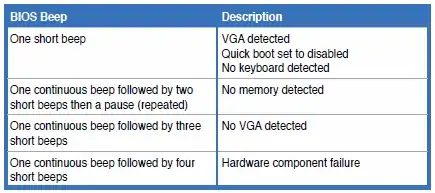
The manual exists on Asus' support site and it contains the beep codes on page 2-16 ("Chapter 2: Getting Started"):


-
Thanks but can you provide the exact url, the manual, or say the steps (what buttons to click) to get inside that manual page?, also continuous means LONG? – ElektroStudios Jul 14 '14 at 19:05
-
1Yes 'continuous' in this case means long. As for providing a direct link -- Nope, it's there, and it may change, and the dynamic link to it would just die in the future. :) When you look up the downloads for your board on the "Download" tab, after you pick an OS, scroll the badly designed (sub)panel down to see more choices (like "Manuals"). – Ƭᴇcʜιᴇ007 Jul 14 '14 at 19:09
-
1"Hardware component failure" The most helpful error message of them all. – Parthian Shot Jul 15 '14 at 00:26
-
2
2
(Motherboard) ASUS BIOS beep codes
- One short beep - VGA detected, No keyboard detected
- Two short beeps - When using Crashfree to recover BIOS, the new BIOS is successfully recognized.
- One continuous beep followed by two short beeps then a pause (repeated) - No memory detected
- One continuous beep followed by three short beeps - No VGA detected
- One continuous beep followed by four short beeps - Failure of Hardware component
