1

Possible Duplicate:
Is there a program to truly delete all deleted files?

I am looking for a tool that wipes (overwrites) unlinked files; preferably something that runs as a kind of disk formatter, overwriting the entire unused portion of the harddrive partition while leaving everything else intact.

2 Answers2

3

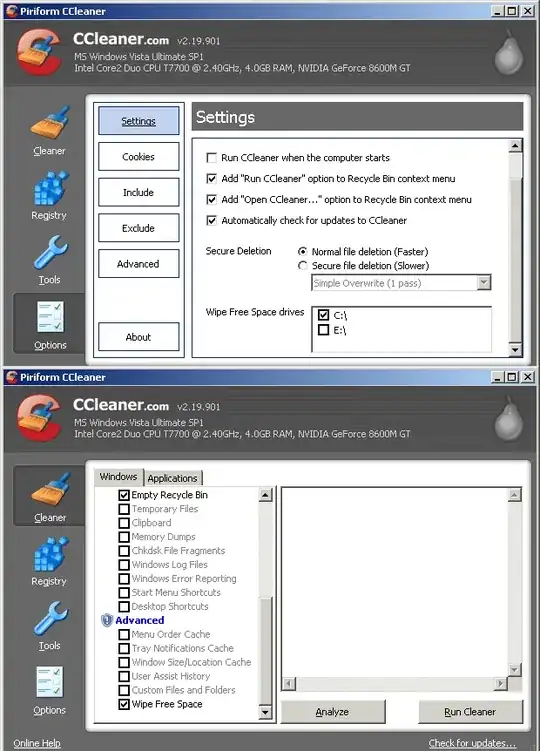
Ccleaner - check the Advanced option, Wipe Free Space.

alt text

Ccleaner is freeware, I recommend using the Portable or Slim version (the default installer will install a browser toolbar).

Gaff
  • 18,569
  • 15
  • 57
  • 68
  • It wont install a toolbar unless you tell it to (AFAIK). – Svish Dec 05 '09 at 19:27
  • 1
    it will, unless you tell it not to (by clearing the checkbox, which by default is checked.) –  Dec 05 '09 at 19:41
  • When you install, unless you blindly click next, you will come to a large selection menu. Most of the options I disable. I don't want the Toolbar, or the extra menu options on the Recycle Bin. I do want the Start Menu entries, but not the Desktop Icon. A lot of free utilities do this, and it is an annoyance that likely grabs the unsuspecting or casual user. – Darren Hall Dec 05 '09 at 21:01
  • sorry, but it's the 'default' setting and that is a BIG minus (indeed the very fact that this browser tool bar is present in the standard installer qualifies Cleaner as adware in my books), hence my recommendation for the Portable or Slim version, which features ALL the options bar the browser tool bar. –  Dec 05 '09 at 21:30
  • As long as I have the choice of unchecking it, I don't care. People who just click on next and ok without reading deserves ad-ware anyways. – Svish Dec 07 '09 at 07:39
  • well, this is your opinion and you are perfectly entitled it. however, it is not up to me to judge what people, who are less careful than you, deserve or not. therefore i will continue to point out this ugly little detail, although Ccleaner certainly is a handy piece of software. –  Dec 07 '09 at 13:29
3

If you run Sysinternal's SDelete with the -z argument, it will cleanse free space on the given drive.

sdelete -z c:

This is a good solution if you want to run as a batch file every so often, or if you just prefer a command line tool.

Stephen Jennings
  • 23,171
  • 5
  • 72
  • 107
  • Thanks for the SDelete tip! However, I am going to omit the `-z` option for sure! I want to __recover__ (undelete) some important files from free space, but the intact files always clutter up the lists. So what I want is rescue the intact files to a target drive (wanted to move these anyway); secure-erase *only* the intact files on the source drive; and eventually, tackle the free space for the undeleted files. Thanks to `sdelete`, the free space will now ONLY contain the deleted files, so all the clutter will be gone when scanning with whatever recovery tool. Just what I needed. – syntaxerror Sep 30 '15 at 09:06
  • Be aware, that SDelete will *not* delete file names on the free disk space (read their website). This is because those names are inside the MFT and SDelete will not touch it. – user136036 Dec 19 '19 at 15:47