0

Recently my disk space reached the 98% mark, and I tried to discover the reason for this. My system consists of two disks: a ssd /dev/sda and a storage hdd /dev/sdb.

My Linux is installed on /dev/sda2 and has 98% disk space left, and the hdd is mounted under /home. I tried to find the filesize under / with

du -h --max-depth=1 /

260M    /root
0       /proc
8,0K    /storageImage
598M    /opt
12K     /srv
0       /sys
84K     /dev
8,4G    /usr
35M     /boot
236G    /run                            
12K     /mnt                              
4,0K    /media                             
12K     /tmp                             
279G    /home                             
17M     /etc                              
642M    /var                              
16K     /lost+found                       
524G    /
524G    insgesamt

Only /usr has a significant size of ~9G. I use arch (systemd) therefore the huge run folder there is /media -> /run/media.

But df shows me this:

df
Dateisystem    Größe Benutzt Verf. Verw% Eingehängt auf
/dev/sda2        58G     54G  1,2G   98% /
dev             7,8G       0  7,8G    0% /dev
run             7,8G    796K  7,8G    1% /run
tmpfs           7,8G     32M  7,8G    1% /dev/shm
tmpfs           7,8G       0  7,8G    0% /sys/fs/cgroup
tmpfs           7,8G     24K  7,8G    1% /tmp
/dev/sdb1       362G    236G  108G   69% /home/dustin/opt
tmpfs           1,6G    8,0K  1,6G    1% /run/user/1000

Where is my disk space?

Edit: Thanks for the hint on Baobab. Other System but similar configuration
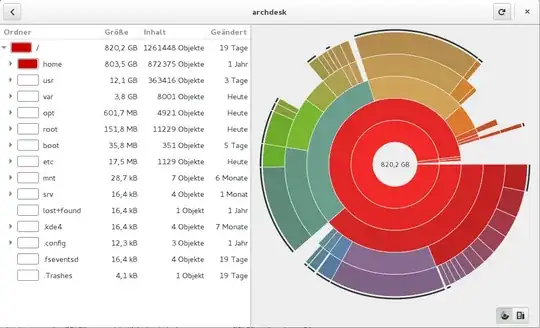
baobab

As one can see, there are 12G for /usr and 4G on /var that sums up to 16G but du says 49G.

df
Dateisystem    Größe Benutzt Verf. Verw% Eingehängt auf
/dev/sda6        64G     49G   12G   81% /
dev             3,9G       0  3,9G    0% /dev
run             3,9G    996K  3,9G    1% /run
tmpfs           3,9G    143M  3,7G    4% /dev/shm
tmpfs           3,9G       0  3,9G    0% /sys/fs/cgroup
tmpfs           3,9G    1,1M  3,9G    1% /tmp
/dev/sdb2       1,1T    716G  284G   72% /home/naikon/opt
tmpfs           784M     20K  784M    1% /run/user/1000

What consumes that 33G of disk space not found by baobab oder df? I can't use the "find" command as suggested. On / the screen is jammed with warnings.

Excellll
  • 12,627
  • 11
  • 51
  • 78
dustin.b
  • 101
  • 1

2 Answers2

1

The easiest way to find out would be:

Commandline

To find the largest 10 files (linux/bash):

find . -type f -print0 | xargs -0 du | sort -n | tail -10 | cut -f2 | xargs -I{} du -sh {}

To find the largest 10 directories:

find . -type d -print0 | xargs -0 du | sort -n | tail -10 | cut -f2 | xargs -I{} du -sh {}

Only difference is -type {d:f}.

Source for the commandline

Jan
  • 1,898
  • 13
  • 18
0

A bit simplified... Starting in ./ (replace with / to get system wide largest files)

find ./ -type f >FILES -printf "%016s %p\n" ; sort -rn FILES | head -n 50 

or if you do not wish to have the list FILES linger around... then:

find ./ -type f  -printf "%016s %p\n" | sort -rn | head -n 50
Hannu
  • 8,740
  • 3
  • 21
  • 39
  • Seems like the `>FILES` belongs elsewhere? – Volker Siegel Sep 30 '14 at 18:40
  • Depends. If you wish to look into the list of files (FILES) in more depth, then the above is quite fine. – Hannu Oct 02 '14 at 21:03
  • I tried. Indeed, it behaves like a normal redirect at the end of the line - does it? Confused... How/why is it possible to have a redirect in the command line between args; and what is the advantage over having the redirect at the end of the line? (I assume the `>FILE` is not handled by `find`, right?) – Volker Siegel Oct 02 '14 at 21:11
  • Actually, these are nice questions to post; So let me just know whether I'm totally off... – Volker Siegel Oct 02 '14 at 21:13
  • In the first version `;` makes things work as if you had entered two lines with `Enter` on each. – Hannu Oct 02 '14 at 21:14
  • ... and indeed file redirection is set up by the shell, `>` followed by a filename (or device name) makes normal printing go there. www.tldp.org has a couple of bash programming guides; check it out. – Hannu Oct 02 '14 at 21:16
  • All what you say is true and perfectly normal. What confuses me it that the `-printf "%016s %p\n"` after the redirection is a command line argument of `find`, and it is used by find, as it influences the output in `FILE`. It is not a shell level `printf`, it's a find `-printf`. Strange. – Volker Siegel Oct 02 '14 at 21:25
  • `man find` - to see what "find" takes as arguments, `-printf` is one option there. The quoted string after -printf tells what and how it should be printed. `%` parameter definition starts, `0` = leading zeros, `16` characters wide, `s` size in bytes, `%p` = path in "normal form" (no tricks), `\n` a linefeed - which is not automatic. – Hannu Oct 02 '14 at 22:00
  • Sure, I know `-printf` of find pretty well, an also the `printf` as shell buildin and as `/usr/bin/printf`. The point was: it's **after** the redirection, and I assumed that a redirection would terminate the list of command line arguments. Until next line, or next `;`. – Volker Siegel Oct 02 '14 at 22:24
  • I made a minimal test with `echo`. It does indeed just work to have a redirection interspersed with the arguments. I **sooo** did not expect that... But the evidence it very direct: `$ echo a b >f1 c d e` `$ cat f1` `a b c d e` – Volker Siegel Oct 02 '14 at 22:30