1

We have a machine that we are trying to limit bandwidth to, using pfSense. This is because the machine is using 80% of our link:
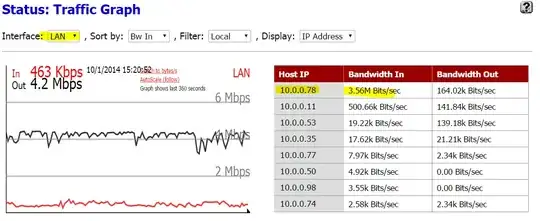
enter image description here

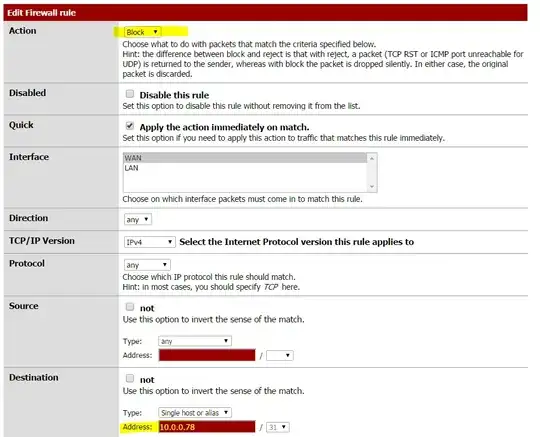
Another brute-force method of limiting bandwidth to an IP address is simply to block it. So we updated a rule to indicate that it should be a Block rule:
enter image description here

We also created another rule, randomly picking other options to try to block 10.0.0.78 from talking to the Internet:
enter image description here

Yet there it is, still consuming the majority of the bandwidth:

enter image description here

And when you log into the machine, uTorrent is still merrily downloading data.

How do you block a computer, by IP address, in pfSense?

Ian Boyd
  • 21,642
  • 49
  • 139
  • 184
  • blocking a computer by IP Address is rather pointless, in my opinion at least. If you block them, they could just do a DHCP renew (or static assign), and would have a new, likely unblocked IP Address. A better way (again, my opinion) would be do do a MAC address block. -- (Moved post out of answers section) – Caraxian Oct 01 '14 at 20:27

3 Answers3

4

I'm sure you've probably resolved this by now, but your screenshots show the rule being created for the WAN interface. You want to block on the LAN interface.

BenYork
  • 136
  • 5
  • 1
    I'd long since given up; but that might be a good note. We learned that there is no such thing as traffic going **to** a LAN address. At first it seemed natural: `google.com:80 --> 10.0.0.78:48231`. Except because of an undocumented shortcoming, the firewall cannot understand traffic going to an internal address. Instead the traffic goes to the public WAN IP: `google.com:80 --> 80.82.64.117:37228`. And then sometime later, someplace else, traffic goes from pfSense: `10.0.0.7:37228 --> 10.0.0.78:48231`. That's why you can't apply firewall rules on the WAN: they don't work. – Ian Boyd Jan 01 '15 at 17:22
2

I have found that you have to kill the active states for that IP address as well before the block will take effect.

W.Lehrer
  • 21
  • 1
  • This isn't really an answer since it isn't a solution to the question. With a little more rep, you'll be able to post comments to offer supplemental information. – fixer1234 Jan 03 '17 at 03:37
0

Because you're using NAT, the internal addresses only exist on the LAN interface and the external addresses only exist on the WAN interface. If you use routable addressing both sides (eg use IPv6) then the same addresses exist on both sides of the firewall.

Because of NAT, by the time the traffic reaches the WAN interface it has already been translated to your WAN address and thus doesn't get caught by your rule.

If you block on the LAN interface, this will break inter vlan connectivity (ie if you have multiple LAN interfaces on your firewall).

NAT sucks.

  • Your answer could be improved with additional supporting information. Please [edit] to add further details, such as citations or documentation, so that others can confirm that your answer is correct. You can find more information on how to write good answers [in the help center](/help/how-to-answer). – Community May 15 '23 at 07:50