1

I bought a copy of Windows 8.1 (System Builder), which I want to install on an old desktop. As expected, the package arrived int he mail with a physical DVD, but I just realised that I don't have access to an optical drive right now.

Is it possible and legal for me to simply download an image and put it on a USB stick for the installation and then use the license that comes with my physical package? My goal is to have an installation that is practically and legally equivalent to having installed from the DVD.

Adrian Ratnapala
  • 448
  • 6
  • 13
  • 1
    Yes, the DVD is just a medium for transferring the package to you. – fixer1234 Oct 02 '14 at 17:28
  • Related/possible Dupe: [Can I reinstall Windows 7 using a pirated cd, but real cd key?](http://superuser.com/questions/298611/can-i-reinstall-windows-7-using-a-pirated-cd-but-real-cd-key?lq=1) – Ƭᴇcʜιᴇ007 Oct 02 '14 at 17:47

1 Answers1

2

Yes. Go here: http://windows.microsoft.com/en-us/windows/buy

Click Upgrade Now

enter image description here

Download the exe file and launch once complete.

enter image description here

Follow onscreen prompts until it is downloaded.

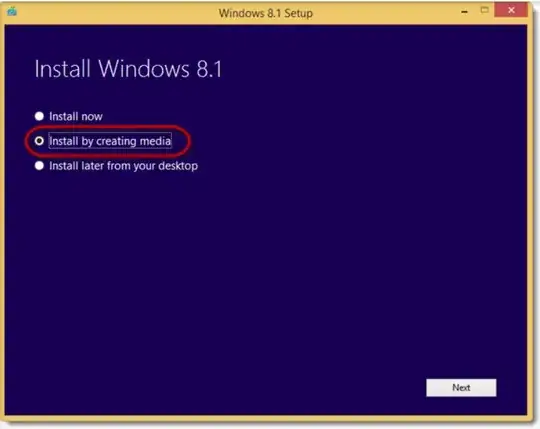
Select the following option:

enter image description here

Followed by:

enter image description here

Hope that helps!

Eric F
  • 3,319
  • 5
  • 24
  • 42
  • I'm trying to figure out exactly where I can download an ISO from. The link you give me doesn't make that very clear. Also I wonder how to match the image I download with the particular version I have on disk. Or does that not matter as long as it is Window 8.1 in the right language. – Adrian Ratnapala Oct 02 '14 at 17:46
  • I use the Windows 7 USB/DVD Download Tool to burn ISOs to optical drive. It's super simple and does an excellent job. Yes, it works for Windows 8 too. http://wudt.codeplex.com/ – music2myear Oct 02 '14 at 17:48
  • Click "Upgrade Now". This will download an exe. Launch the exe and it will download the ISO file from Microsoft. – Eric F Oct 02 '14 at 17:50
  • The author does not have access to an optical disk drive, so how exactly, will they create the .iso file. **You cannot use a `System Builder` license to download the .iso provided by Microsoft** – Ramhound Oct 02 '14 at 17:52
  • Adrian, I edited my answer. Take a look now. – Eric F Oct 02 '14 at 17:58
  • @EricF as seen from my IP, the page you link does not have an "upgrade now" button. So I am downloading some ISO from some other corner of the interweb. – Adrian Ratnapala Oct 02 '14 at 18:07
  • @Ramhound does that mean I will need to find an optical drive and either use it directly or rip an ISO from the physical DVD? – Adrian Ratnapala Oct 02 '14 at 18:09
  • hm I appologize then. That is what I saw when I clicked on the link I provided. Either way though it seems as though the CD has its own "to USB" option on it which can save you from downloading another. – Eric F Oct 02 '14 at 18:09
  • @EricF, it probabably does. The embarrassing thing is that I simply have no working DVD drive in my house, not any machine! I just assumed I would have one, but I don't. – Adrian Ratnapala Oct 02 '14 at 18:11
  • Thats why I have both a usb floppy drive and a usb optical drive / burner I always keep :) If my post helped at all, feel free to mark it as an answer. I do hope it works for you. – Eric F Oct 02 '14 at 18:36
  • @AdrianRatnapala - The physical disk might be the simplest, but if you have no optical disk drive, then you have to download the .iso – Ramhound Oct 02 '14 at 19:05
  • @EricF realised that the reason I see a different web-site is that my browser was running under Linux. From a windows machine, I do get the install program that you show. Though I haven't yet got it to download an image. I am upvoting you because it was a a good try, but I can't accept it, because this hasn't worked for me yet. – Adrian Ratnapala Oct 03 '14 at 02:46
  • Fair enough. Did your image work from the other site at least? – Eric F Oct 03 '14 at 11:35