11

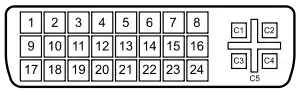
I wonder what are the three buttons added to the touchpad/keyboard of the laptop Dell Latitude E6520 as the below snapshot.

I do a google search as here though nothing helpful for me.

If you know that they are, please share.
enter image description here

Hennes
  • 64,768
  • 7
  • 111
  • 168
Nam G VU
  • 12,146
  • 60
  • 135
  • 209
  • 3
    The middle button is really useful as a "open in a new tab" even when you're not using the trackpoint. –  Nov 03 '14 at 14:52

3 Answers3

9

The buttons on the left and right are left and right clicks for when you're using the "pointing stick" between G, H, and B.

The middle button will either be a middle click, some sort of scroll, or a "lock" for the left click to make clicking and dragging easier.

Windos
  • 11,061
  • 4
  • 38
  • 56
  • Thank you. I get what they are now. I think it's useless since we have the touchpad... – Nam G VU Nov 03 '14 at 09:57
  • 6
    Some people find using that track point/pointing stick more ergonomic and was(/is?) a big selling point of the ThinkPad laptops. Different strokes for different folks, I guess. – Windos Nov 03 '14 at 10:05
  • 3
    Wow, I had no idea that some Dells also have [these](http://xkcd.com/243/). I wish mine also did – Kos Nov 03 '14 at 14:38
  • @Kos you need to buy your next Dell from the Small Business section of the website. The pointy sticks are limited to (some) Latitude and Precision models. Alternately, some Thinkpads offer them; and at one point so did some HP business class models (not sure if they still do or not). – Dan Is Fiddling By Firelight Nov 03 '14 at 14:55
  • 1
    @NamGVU Some people, like me, disable the touch-pad completely. I have a mild medical issue with my hands. I can type without problems, but I have to use the area below the keyboard as a wrist rest. This makes the touch-pad unusable. The small joystick works fine for me. I'm so used to it now that the only way I can use a laptop without joystick is with an external mouse. – Tonny Nov 03 '14 at 16:53
  • @DanNeely HP Elitebooks (the business-line models I have seen at least) still have them. Most (all ?) business-line Thinkpads still have them too. They are pretty rare on consumer laptop though. – Tonny Nov 03 '14 at 16:55
4

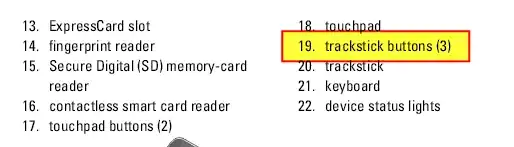
They are the buttons that go with the trackstick.


Source Setup and Features Information:

enter image description here

enter image description here

DavidPostill
  • 153,128
  • 77
  • 353
  • 394
1

The middle button below the "b" and space bar will scroll. For example press that button and move the pointing stick up and down, it will scroll.

Totty.js
  • 472
  • 5
  • 8
  • 18