0

I am using Windows 7 and a Paste image got stuck on my windows screen which is not going away as shown in the image below. Does anyone know how should I remove it? I don't want to restart my computer every time to get rid of it which I have done many times in the recent past. Please let me know any other solution.
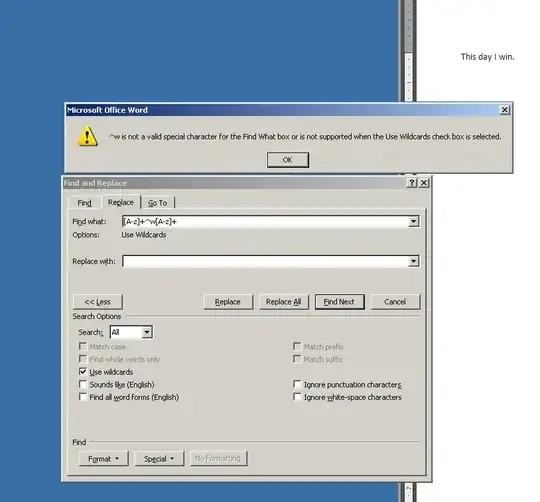
enter image description here

Sathyajith Bhat
  • 61,504
  • 38
  • 179
  • 264
John
  • 203
  • 3
  • 11
  • `Run -> and type tskill dwm `solved my problem. – John Dec 02 '14 at 19:33
  • Just restart Windows. – Ramhound Dec 02 '14 at 20:08
  • 1
    @Rambound I don't want to restart my windows everytime as I mentioned. – John Dec 03 '14 at 04:02
  • OP took the time, clearly explained issue and even posted a screen shot! Although some *could* argue he didn't research it well, I think the downvote was unjust so +1 – Dave Dec 04 '14 at 13:01
  • Thanks Dave. Also the other question (http://superuser.com/questions/57016/menu-select-item-stuck-on-screen-after-context-or-command-menu-has-closed) has very complex title which is difficult to find on google search. Otherwise I wouldn't have posted this question here. The question didn't come up on my search. – John Dec 04 '14 at 19:15

2 Answers2

0

Restarting windows explorer from the task manager should take care of that.There is a good tutorial here:http://www.guidingtech.com/4708/restart-windows-explorer/ .

jason C
  • 44
  • 3
  • Thanks. Do you know what is the actual cause of it? – John Dec 02 '14 at 19:18
  • This:http://superuser.com/questions/57016/menu-select-item-stuck-on-screen-after-context-or-command-menu-has-closed seems to have the answer. Also has a way to prevent it from happening. I'm not sure if my suggestion is going to work, based on what I just read there. Let me know. The answers given there might have been driven by a desire to not restart windows explorer. – jason C Dec 02 '14 at 19:34
0

Two things you could try. Right click on the desktop and select refresh. You can also right click the desktop and hover over the "paste" option and then left click the desktop after, I've found that works at times.

adc90
  • 101
  • 1