-1

I just got a new phone with a lot more space. This means I can put my lossless audio on... trouble is, iTunes doesn't support flac.... There is alac, but I have yet to find a quality converter to convert flac to alac... does anyone know of one?

edit: Sorry, forgot about OS. Windows 8.1

Lillz
  • 13
  • 1
  • 4
  • On what OS would you like to do that? What have you tried yourself? Googling gave me [a nice hit](http://www.macupdate.com/app/mac/23430/x-lossless-decoder) for OSX as a firstresult. – agtoever Dec 07 '14 at 19:58
  • Whoops, duh sorry, windows 8.1 I've tried a lot of audio converters that support m4a (the extension of alac) but perform a lossy conversion. As I said, I have yet to find a program that performs this operation lossless-y. – Lillz Dec 07 '14 at 20:00
  • Open you favorite browser, enter the words: "windows flac to alac" and there are really a lot of usefull links... – agtoever Dec 07 '14 at 20:03
  • Yeah. Did That already. Tried all of them. Most are adware and worthless and the one legitimate one, dbpoweramp, costs quite a bit. – Lillz Dec 07 '14 at 20:15
  • On Windows you can use foobar2000 and the encoderpack. On Windows, Linux and Mac you can use PowerShell, flac and ffmpeg. Check my post for more details: [Convert music files from FLAC to ALAC](https://www.meziantou.net/convert-music-files-from-flac-to-alac.htm?utm_medium=social&utm_source=superuser) – meziantou Jul 16 '19 at 21:32

1 Answers1

1

I have yet to find a quality converter to convert flac to alac

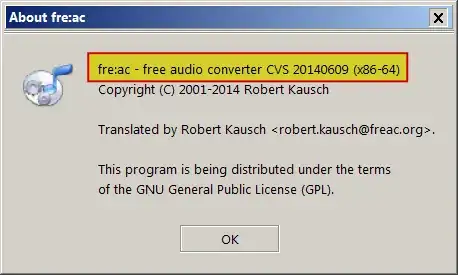
fre:ac supports FLAC to ALAC.

enter image description here

enter image description here

fre:ac

fre:ac is a free audio converter and CD ripper with support for various popular formats and encoders.

The Core Audio encoder supports AAC and ALAC formats and is available on Windows if you have iTunes or QuickTime installed. Unfortunately, it can only be used with the 32 bit version of fre:ac as Apple does not provide a 64 bit version of the Core Audio framework for Windows, yet. Source fre:ac snapshot 20140223

Disclaimer

I am not at all affiliated with fre:ac in any way, I just use it and find that it works for me.

DavidPostill
  • 153,128
  • 77
  • 353
  • 394
  • I wonder if that's only on that snapshot version, I tried free:ac with the regular download and it only had AAC --- no option for ALAC. I'll try this in a bit – Lillz Dec 07 '14 at 21:25
  • Images added to show encoder location – DavidPostill Dec 07 '14 at 21:38
  • ah thanks. Yeap, the standard download doesn't have that option, snapshot does. Thanks for the help and not giving the 'google it' 'advice.' – Lillz Dec 07 '14 at 22:18