44

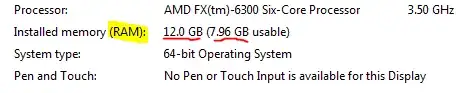
I have recently upgraded a Windows 7 Home Premium PC with 12 GB of RAM. For some reason once I looked in the System tab it said only 7.96 GB of 12 GB of RAM is usable. I have already tried to go into the msconfig to see if the Maximum Memory was ticked, which it wasn't.

Is there a solution to this error? The other topics that I have viewed on Super User did not help me at all.

Installed RAM:
https://i.stack.imgur.com/W6tky.png

msconfig:
https://i.stack.imgur.com/zVhFP.png

My Windows Edition is showing "Home Premium":
enter image description here

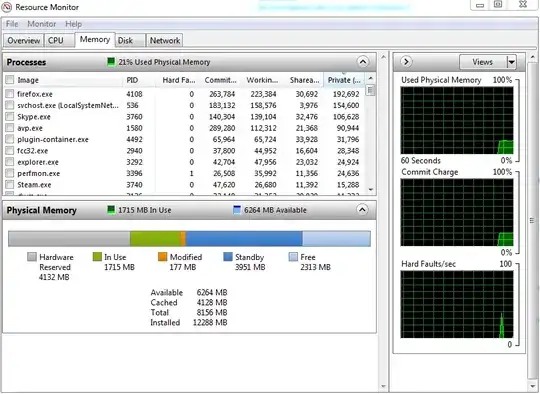
Resource Monitor:

Resource Monitor

DavidPostill
  • 153,128
  • 77
  • 353
  • 394
charrev
  • 535
  • 4
  • 9

3 Answers3

42

Physical Memory Limit

The physical memory limit depends on which version of Windows you have. However the usable memory (which may be less than the installed memory) depends on other factors (see below).
enter image description here

You have Windows 7 Home Premium (64 bit). According to the above table the maximum physical memory is 16 GB.

Source Physical Memory Limits: Windows 7


Usable Memory

All of the physical memory may not be usable.

On a computer that is running Windows 7, the usable memory (RAM) may be less than the installed memory.

The reduction in available system memory depends on the configuration of the following:

  • The devices that are installed in the computer and the memory that is reserved by those devices
  • The ability of the motherboard to handle memory
  • The System BIOS version and settings
  • The version of Windows 7 that is installed (For example, Windows 7 Starter Edition only supports 2 GB of installed memory.)
  • Other system settings

If you have a video card that has 256 MB of on-board memory, that memory must be mapped within the first 4 GB of address space. If 4 GB of system memory is already installed, part of that address space must be reserved by the graphics memory mapping. Graphics memory mapping overwrites a part of the system memory. These conditions reduce the total amount of system memory that is available to the operating system.

...

Check BIOS settings

The problem may occur because some BIOS settings are incorrect.

Enable the memory remapping feature

Check the BIOS settings to see whether the memory remapping feature is enabled. Memory remapping gives Windows access to more memory. You can enable the memory remapping feature in the BIOS by booting to the system setup. See the User's Guide for your computer for instructions on how to boot to system setup on your computer. The name for the memory remapping feature may be different for different hardware vendors. This can be listed as memory remapping, memory extension, or something similar. Be aware that your computer may not support the memory remapping feature.

Change the AGP video aperture size in the BIOS settings

Check the BIOS settings to see how much memory that you have allocated to AGP video aperture. This is the memory that the system is sharing with the video card that is used for texture mapping and rendering. This memory would not be used by the system, because it is locked by the video card. You can adjust the AGP video aperture size in the BIOS. Standard settings are "32MB,""64MB,""128MB,"and "Auto." After you change this setting in the BIOS, restart your computer, and then check the usable memory. You can test each setting to see which offers the best results.

Source The usable memory may be less than the installed memory on Windows 7-based computers
DavidPostill
  • 153,128
  • 77
  • 353
  • 394
  • 2
    In my system settings it says I have Windows 7 Home Premium. http://imgur.com/6zZdMWq – charrev Jan 18 '15 at 14:01
  • Windows 7 Home Premium has 16GB limit so it's not OS. – Davidenko Jan 18 '15 at 14:01
  • 8
    Note: those limits are likely shared with the graphics card. So if your graphics card(s) had a significant amount of on-card ram, you could still encounter problems with home Premium and 12 GB of motherboard ram. – Jonathon Jan 18 '15 at 17:09
  • 3
    It’s actually very unlikely these limits are shared with GPU memory because all of them are enforced by licensing restrictions, not hardware restrictions. It’s pretty easy to take mapped memory into account when programming checks for that. – Daniel B Jan 18 '15 at 18:19
  • 10
    "The maximum available memory depends on which version of Windows you have." I would rather phrase that, "The amount of memory that Windows blatantly withholds for no practical reason whatsoever depends on which version you have". (Though, as you said, this isn't actually the issue here.) – leftaroundabout Jan 19 '15 at 13:16
  • @leftaroundabout Reply tweaked as per your comment. – DavidPostill Jan 19 '15 at 13:39
  • 1
    @JonathonWisnoski They are not. It is definitely possible to have 16GB fully usable in Win7-HP with a large GPU also installed. – J... Jan 19 '15 at 13:41
  • 1
    I believe the article from Microsoft is referring to on-board graphics cards, and not discrete cards. The motherboard should have nothing to do with memory management of a discrete GPU. – Logarr Jan 19 '15 at 20:42
  • I am a programmer. I seriously wonder what's the reason of this limitation except squeezing money from users. – user Jan 20 '15 at 01:14
  • @user I suspect you are right. See this [answer](http://superuser.com/a/710975/337631) – DavidPostill Jan 20 '15 at 06:39
22

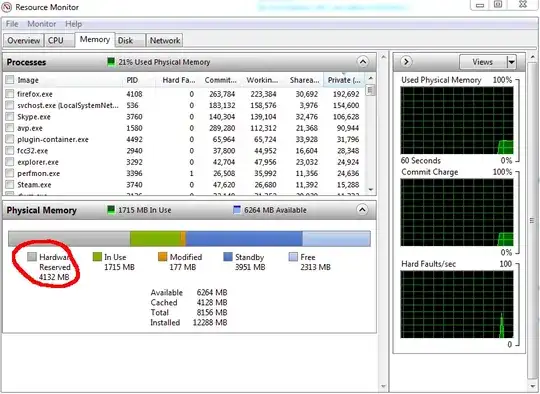
An image is worth more than thousand words:

enter image description here

Those are your missing 4 GiB of memory. What exactly is using them? The usual suspect is the graphic card (you must consult your manual to check that your card really have/use it's own RAM), integrated graphic card (some motherboard doesn't disable the internal graphic card when you pin a dedicated one, in this case you must disable it manually, or reduce the VRAM usage to the minimum if it's not possible to disable it (a ROM update might be necessary)), the BIOS hiding the memory, using a unsupported RAM configuration, etc.

You can type devmgmt.msc in the start menu to open the Device Manager and check Resources by Connection in the View Menu, and expand the Memory node. This would show exactly what's using the memory (if it's used by hardware) or something else.

Reference:

Braiam
  • 4,709
  • 3
  • 26
  • 57
  • 1
    This answer is misleading. There's no video card in the world that occupies 4 GB of address space. (Of course there are cards with 4 GB of video RAM on board, but that doesn't mean it needs 4 GB worth of physical addresses. – Jamie Hanrahan Sep 06 '15 at 11:33
  • @JamieHanrahan who said that only video cards use memory addresses? I only said, that is the most common. – Braiam Sep 06 '15 at 12:21
  • It's also commonly the largest, by a very wide margin. I/O devices are not the problem here. Maybe if he had eight video cards... – Jamie Hanrahan Sep 06 '15 at 12:50
  • @JamieHanrahan I'm not sure what you are getting at. – Braiam Sep 06 '15 at 15:09
  • I'm saying video cards and other I/O devices are not the problem. No way are they going to use up 4 GB. – Jamie Hanrahan Sep 06 '15 at 20:12
  • @JamieHanrahan evidence suggest the contrary, also don't be too quick to dismiss faulty hardware/firmware – Braiam Sep 06 '15 at 21:18
  • The evidence only shows that something is preventing 4 of the 12 GB from being usable by the OS. It doesn't specfically point to I/O devices. IME this is usually due to a chipset or firmware issue. – Jamie Hanrahan Sep 06 '15 at 22:23
2

See http://support.microsoft.com/kb/978610/

For example...a 64-bit version of Windows 7 may report that there is only 7.1 GB of usable system memory on a computer that has 8 GB of memory installed.... Usable memory is a calculated amount of the total physical memory minus "hardware reserved" memory.

It cites shared graphics cards as being a likely cause - do you know if you computer has a dedicated or on-board (aka shared) card).

It is highly unlikely this is a speed compatibility or other hardware issue as the memory would likely not register at all.

In the BIOS you may be able to configure shared graphics memory and reduce it.

Sathyajith Bhat
  • 61,504
  • 38
  • 179
  • 264
Paul Ridgway
  • 137
  • 3