Terms:
- VM = Virtual Machine
- LUN = Logical Unit Number Used In SANs
- SAN = Storage Area Network
- S2K8R2 = Windows Server 2008 R2 OS
Backstory:
OK so I have a SAN (Dell MD3200) that I have created a bunch of LUNS on. One LUN of 2TB was reserved for the FTP server. So after creating the LUN called "FTP" I hopped over to my physical box (S2K8R2) and made sure the drive was showing in the disk manager (it was), then I added the disk to my cluster. Once added to the cluster I moved that drive resource to my FTP VM. The drive popped up in the FTP VM (S2K8R2) and I was using it like toast uses butter (I know, I won't do it again).
Question:
Now that I have the drive and using it on my VM I tried to change the name of the drive like all my other drives that are available to me (some also from the SAN). But I can not change the name of my FTP drive to "FTP"! I have tried doing it through the properties box and right clicking on it then rename. I also tried using "label F:FTP" at the command prompt.
Any ideas?
UPDATE:
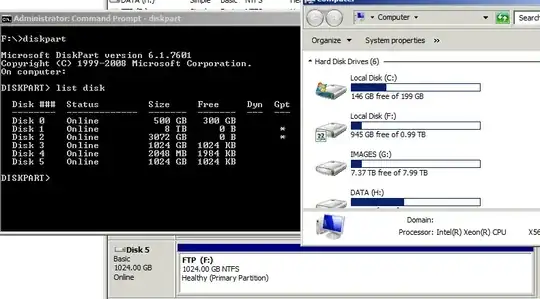
I was trying to also go the extent of trying to get the properties of the drive via diskpart. So I needed to know the disk number (ex: Disk 5). In doing this I noticed that in disk manager it shows up right... Also, when doing diskpart my Disk 5 free space is totally wrong! It says I have 1024KB free when it should reflect around 1020 (or so) GB because as you can see on the right it has (0.99TB) free. Weird.