1

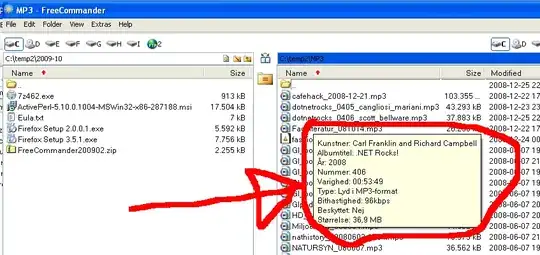
How do I disable the balloons/popup that appears when a file/folder has been shown for 1-2 seconds in FreeCommander, v. 2009-02 (screenshot below)?

I am not sure if this is specific to FreeCommander, exactly the same appears in Windows Explorer.

Platform: Windows XP, non-English.
alt text

Gaff
  • 18,569
  • 15
  • 57
  • 68
Peter Mortensen
  • 12,090
  • 23
  • 70
  • 90

1 Answers1

3

To disable pop-up descriptions in Explorer go to Folder Options -> View tab and uncheck "Show pop-up description for folder and desktop items".

Should also work in FreeCommander if those popups are the same as in Explorer.

Edit: I checked the FreeCommander and it's unrelated to Explorer setup. You have a setting for it:

  • go to menu Extras -> Settings
  • in View settings uncheck "Show files tooltip"
T. Kaltnekar
  • 8,294
  • 2
  • 29
  • 25