2

I work in a pharmaceutical warehouse in Greece, we resell pharmaceutical products to local stores. We print about 1000 Invoices per day, in preprinted paper (color) with a Kyocera 4200DN (black & white).

We own 3 Kyocera 4200DN for that specific purpose, as they keep having the same problem that renders the printer useless: they jam paper in the rear cover, and the problem seems to be a metal part that drops and blocks the paper from getting out:
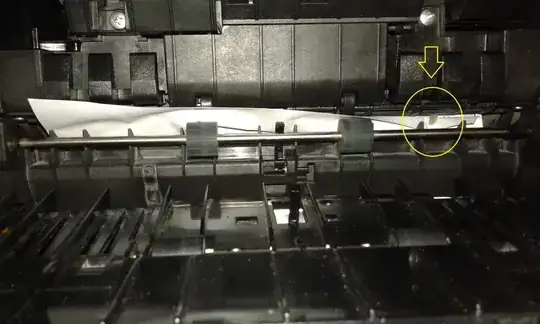
enter image description here

The local reseller and the country reseller can't seem to help me, as they state various reasons for this happening, that seem irrelevant and random to me so far (for example: update firmware to the latest version, which didn't help AT ALL the one that had the latest firmware). I keep sending the printers for cleanup to the local reseller and keep getting them back with the statement "why did you send this to me? it works perfectly, i just cleaned it up", only to have a jam a few minutes after i install them.

I must add that the setting for paper is in "Preprinted" for the cassette (which we use).

I am desperate, should i stop trusting Kyocera (we have other models in other areas of the warehouse, with which we are pleased so far) or is it something else?

EDIT: I am accepting SPRBRN's answer, as humidity seems to be the problem so far. I moved one of the printers that seemed to be very problematic to an a/ced room and printed like a thousand pages with only one jamming and in different place (i printed some pdfs in duplex to stress the machine and it got stuck in duplex mechanism of the printer, not in the rear). In case i tend to believe otherwise, i will come back and make a question.

gemantzu
  • 155
  • 1
  • 5
  • You mention preprinted paper. What does that mean? Is it paper with a logo and contact info? Is that preprinter by a professional printer or done with a color ink jet or laser printer? What happens if you use normal white laserprinter paper? Is the paper of the right quality? – SPRBRN Jan 27 '15 at 08:33
  • Yes, sorry not mentioning this, it comes from professional printers, we order it to a local professional printer store (i don't know how else to describe it) and as i have come to realise the paper comes in big rolls, printed, baked and cut to a4 format (not necessarily in this order). – gemantzu Jan 27 '15 at 08:48
  • What if you use plain white laser printer paper? Furthermore, if you send in that printer for repair, give them a stack of your invoice paper to test! How about humidity in your office? Is that too high? – SPRBRN Jan 27 '15 at 09:02
  • 1
    Humidity is always high in the area, and in the warehouse. In the past, i tried using the printer in other areas with plain paper but it still jammed (not in the same frequency though). I always send our paper when i send it for repair. I must add that the printers are a bit up or below the monthly duty cycle (250k pages). – gemantzu Jan 27 '15 at 10:13
  • If you have a local reseller which you can visit yourself, go there and see it work. Take a laptop with you with sample invoices with your invoice paper and run them in their shop. Then show them what happens. Maybe they're right and it runs normally in their shop and not in your office, maybe they don't test properly and then you have to show them. The metal part may be the problem, but not for three printers. Then you would find more reports on this problem online. List the "various reaons" they use to explain the problem in your question, even though they might seem irrelevant to you. – SPRBRN Jan 27 '15 at 10:56

2 Answers2

0

No one mentioned rollers need replaced?

High humidity causes jamming? It would erode the board or cause a short if it moisture related.

The rollers are the issue. Probably worn. That volume of printing. If it can't grip the paper it jams.

I'm a factual I.T. FIELD TECH. Jams are usually roller related. Worn need replaced.

Humidity? No. High temps? Rubber expands. Cold temps rubber contracts. And if a roller is worn? It won't feed the paper right.

That metal tab? It isn't broken. That metal bar / tab is to clear the jam. Under the paper tray. Is the lever.

Have a nice day. Hope this helps.

0

My comments in an answer:

  • Test with good quality plain white laser printer paper.
  • How is the humidity in your office? High humidity can jam paper.
  • Visit the reseller, take your laptop plus a bunch of sample invoices and run a test there. Maybe they're right and it runs normally in their shop and not in your office, maybe they don't test properly and then you have to show them.
  • The metal part may be the problem, but not for three printers. Then you would find more reports on this problem online.
  • List the "various reaons" they use to explain the problem in your question, even though they might seem irrelevant to you.
SPRBRN
  • 7,384
  • 14
  • 61
  • 90
  • 1
    Ty for your effort so far! 1)i have tested with Premium Copy paper (recommended by the Greek representative of Kyocera) but will try again today. 2)High humidity is problem of the city we live in, now it is 71% without even raining. How do i protect the printer from that? 4)The metal part shows up in all three printers 5)Unprotected paper to humidity (not true as i have demonstrated to local reseller), fmw update (not true, latest firmware jams as well), tired printer (latest printer jams as well) 100m away, there is a 3920,prints in plain and has reached 700k, with only the std maintenance. – gemantzu Jan 27 '15 at 12:41
  • You can control humidity with air conditioning. So if you can put the printers in one room, with a mobile AC and humidity tester, that could be a good test. And don't forget to try suggestion 3! If you appreciate my effort, you can upvote my answer, and you should do that for anything that you can use or that is informative and helps to find an answer. – SPRBRN Jan 27 '15 at 13:07
  • it requires 15 rep which i still don't have (i have 11) > – gemantzu Jan 27 '15 at 13:09