-1

I am asking it here because I did not know where to ask this question, looked it up and this is what I found: https://meta.stackexchange.com/questions/57998/hardware-questions-and-stack-exchange

I am looking for an IDE connector for Fujitsu MHT2030AT hdd (Apple ibook G4). I would be happy as long as it lets me connect to any of the today's technology USB, SATA, anything.

Here's what it looks like (Scale - centimeter)
enter image description here

The detailed manual of this hdd can be found here: http://www.fujitsu.com/downloads/COMP/fcpa/hdd/discontinued/mht20xxat_prod-manual.pdf

It's basically a 44 pin connector. So far I have tried a couple of 44 pin connectors on eBay Australia but none of them are were thin enough to fit this disk.

Any help would be much appreciated.

Cheers

fixer1234
  • 27,064
  • 61
  • 75
  • 116
Anon
  • 213
  • 2
  • 5
  • 16
  • Why has this been downvoted without any reasoning? I did my research and just the device mentioned in the answer was not available in any of the Australian stores so I just asked it here for a second opinion. – Anon Feb 05 '15 at 16:27

1 Answers1

1

You will need a connector for a 2.5" IDE drive.

They will look something like this:

2.5" to 3.5" IDE connector

You can find a list of compatible connectors here (depending on how you want to connect it):

http://www.ebay.com/bhp/laptop-ide-adapter

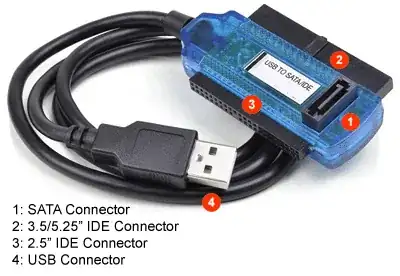
Or, you could buy something like this, which is more convenient, if you are going to use old hard drives on a regular basis:

USB to IDE & SATA connector

One of these options will let you connect a 2.5" IDE drive (which is what your picture shows) to a computer with either USB or 3.5" IDE or SATA (not shown in my pictures).

Kristian
  • 3,102
  • 13
  • 21
  • Can you please link to the second item? The female part looks quite thin here, something that I have not seen so far. A lot of sellers have said no to this hdd. – Anon Feb 02 '15 at 12:46
  • 1
    http://www.ambery.com/idesatousb20.html this is a standard component. From your picture, I'd say yours is standard also, but I cant guarantee it fits. – Kristian Feb 02 '15 at 12:49
  • Cheers dude. I will accept this answer if it fits. Yeah, it looked pretty standard to me too when I took the case but realised that it's a lot thinner than the usual laptop hdds and those 4 jumper pins aren't helping. – Anon Feb 02 '15 at 12:54