-2

I'm using Windows 8.1 x64, and I'm trying a legacy app.

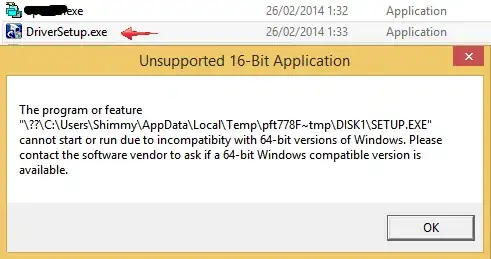
I get an error message complaining that the program is not compatible with x64.

Is there a way to force a program to run on 32-bit mode on a 64-bit system?

Here are some screenshots, that might shed a light on what type of program this is:

I run the program pointed to by the arrow, and the message show up one after the other (when clicking OK):
enter image description here

magicandre1981
  • 97,301
  • 30
  • 179
  • 245
Shimmy Weitzhandler
  • 3,480
  • 15
  • 43
  • 65
  • You will need to provide information. Its not exactly clear what your asking. There are far to many variables to explain the error message you got. – Ramhound Feb 02 '15 at 14:16
  • are you trying to run it or install it? – meatspace Feb 02 '15 at 14:47
  • possible duplicate of [Why can't a 64 bit OS run a 16 bit application?](http://superuser.com/questions/140953/why-cant-a-64-bit-os-run-a-16-bit-application), [How to make an extremely old app run on 64bit Windows?](http://superuser.com/questions/662457/how-to-make-an-extremely-old-app-run-on-64bit-windows?rq=1) – Ƭᴇcʜιᴇ007 Feb 02 '15 at 15:06

1 Answers1

10

Since you have provided so little information, I am going to hazard a guess that the program your are running is not actually 32 bit, but 16 bit.

Look at the title bar of the first screenshot. It says "Unsupported 16-Bit Application"

32 bit Windows applications should run under 64 bit Windows. 16 bit applications will not.

I believe if you really have to run this application, you can get around this by running 16 bit application in a 32 bit virtual machine.

Ƭᴇcʜιᴇ007
  • 111,883
  • 19
  • 201
  • 268
Keltari
  • 71,875
  • 26
  • 179
  • 229