2

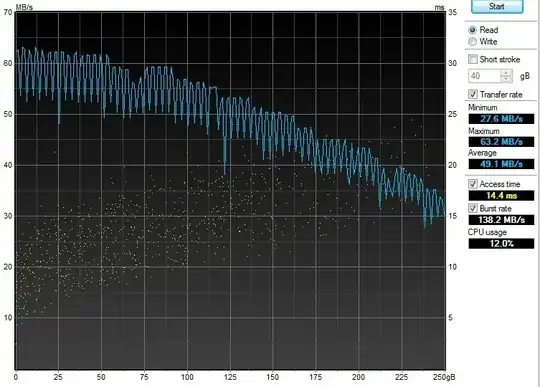
I have a USB 3.0 external HDD enclosure, and I installed an old HDD from my desktop into it. Naturally I’d like to see how it will perform, so I have HD Tune running a benchmark. However the graph produced looks very strange to me.

enter image description here

Before, the graph for this particular hard disk drive—or any other HDD on my desktop—does not oscillate as much. It seems something is “throttling” the speed in regular frequency.

Should I be worried about this behavior? Is this characteristic of storage mediums connected via USB 3.0? Or maybe I should ask, what does the oscillation mean?

Giacomo1968
  • 53,069
  • 19
  • 162
  • 212
yongtw123
  • 131
  • 3
  • I don't see why you should be concerned. I've seen HD Tune graphs like this before. There is no 'throttling' happening here. HD Tune is reporting the decreasing read speeds and increasing access times for increasing file sizes. If you're concerned, try running a benchmark using CrystalDiskMark as well. – Vinayak Feb 24 '15 at 05:57
  • Yes I know the overall downward trend is expected, but my point is the large variation of oscillation (zigzagging at regular, high frequency). – yongtw123 Feb 24 '15 at 06:06
  • That I'm not so sure about. Do you have another USB HDD enclosure to test with? – Vinayak Feb 24 '15 at 06:08
  • Unfortunately no, hence I'm asking if there are similar cases with other users of USB 3.0 HDD enclosures. – yongtw123 Feb 24 '15 at 06:16
  • Could you specify the hard drive and the USB 3.0 HDD enclosure model that you used? – Vinayak Feb 24 '15 at 06:18
  • It's a Hitachi hdt725025vla380. Enclosure is one by CyberSLIM S82M-U3, though I think the chip it uses, Prolific Technology PL2773, should be of more interest? – yongtw123 Feb 24 '15 at 06:31
  • I looked at a few forums and the reason for the zig zag, sawtooth pattern has been attributed to either a third party program (like a virus scanner) interfering with the benchmark or the HDD being old. Could you perform another HD Tune benchmark while the HDD is attached to your computer using SATA? – Vinayak Feb 24 '15 at 07:10
  • I'll have a benchmark graph later. In the meantime here is a comparison between "via SATA" and "via USB 3.0" with another HDD, FYI. http://i.imgur.com/kz2mJ6E.jpg The oscillation is more pronounced near the end of graph. – yongtw123 Feb 24 '15 at 07:26
  • 1
    One possible **guess** is that the USB3 enclosure can't keep up with the peak transfer rate of the drive. So when all the buffers get full you have to wait for a rotation of the hard disk before the next data is available. – user3710044 Feb 24 '15 at 08:21

1 Answers1

1

Summary: After some research, the reasons seems to be due to the SATA-USB controller inside the enclosure. The oscillating pattern is unusual behavior, but without a technological explanation whether this behavior will hurt the HDDs remains unanswered.

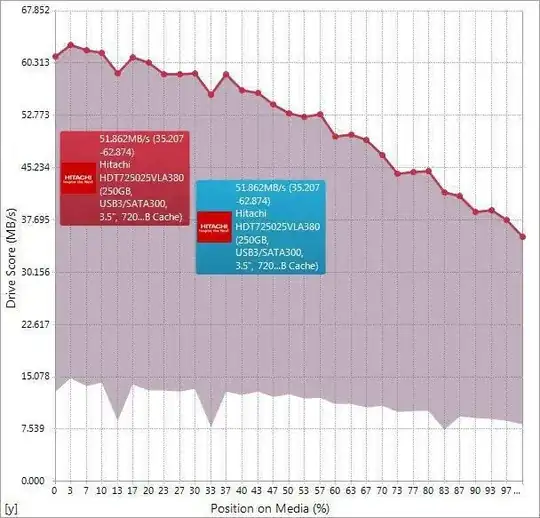
I tested with several HDDs using the enclosure and all of them exhibit the oscillating behavior, as such (this time using Sandra)
screenshot

This (could have) ruled out the possibility that the enclosure wasn't able to keep up with the transfer rate, since using a slower drive didn't prevent this issue. Of course to be conclusive some experiments must be conducted but I don't know how.

Out of curiosity I tried a firmware flashing tool from the controller manufacturer's site. Surprisingly just after I read (no flashing involved) the ROM chip of the controller, the oscillating behavior disappeared, as such:
screenshot

After a reboot, though, the behavior returned. Dumbfounded, I reported this issue to the enclosure manufacturer, and they responded it was an IC design issue on the controller manufacturer's part. I'm still waiting a response from the controller manufacturer (though unlikely since they deal with vendors not general consumers).

The last resort would be to flash the controller firmware with a newer version I found on the controller manufacturer's site, but this is a risky operation.
Glorfindel
  • 4,089
  • 8
  • 24
  • 37
yongtw123
  • 131
  • 3